<p>Hello guys, JustLeafy here. Today, I would like to suggest three things for modifying the ToC:
</p>
- Fixing its functionality (good thing we have FloatingToc).
- Giving it additional options along with more customization.
- Cleaning its design, to make it more modern and to remove the whitespace it has caused.
<div class="center"><figure class="article-thumb tnone show-info-icon" style="width: 650px">

<figcaption>
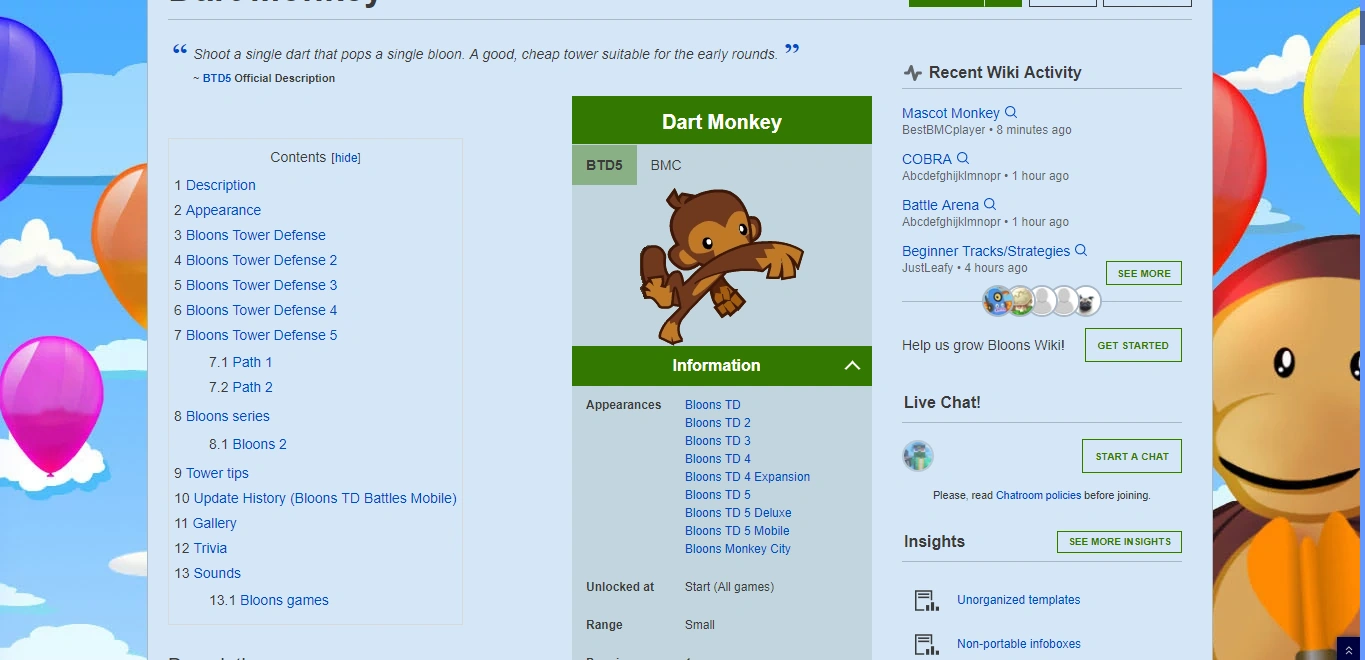
<p class="caption">This is the current Table of Contents.</p> </figcaption></figure></div>
<div class="center"><figure class="article-thumb tnone show-info-icon" style="width: 650px">

<figcaption>
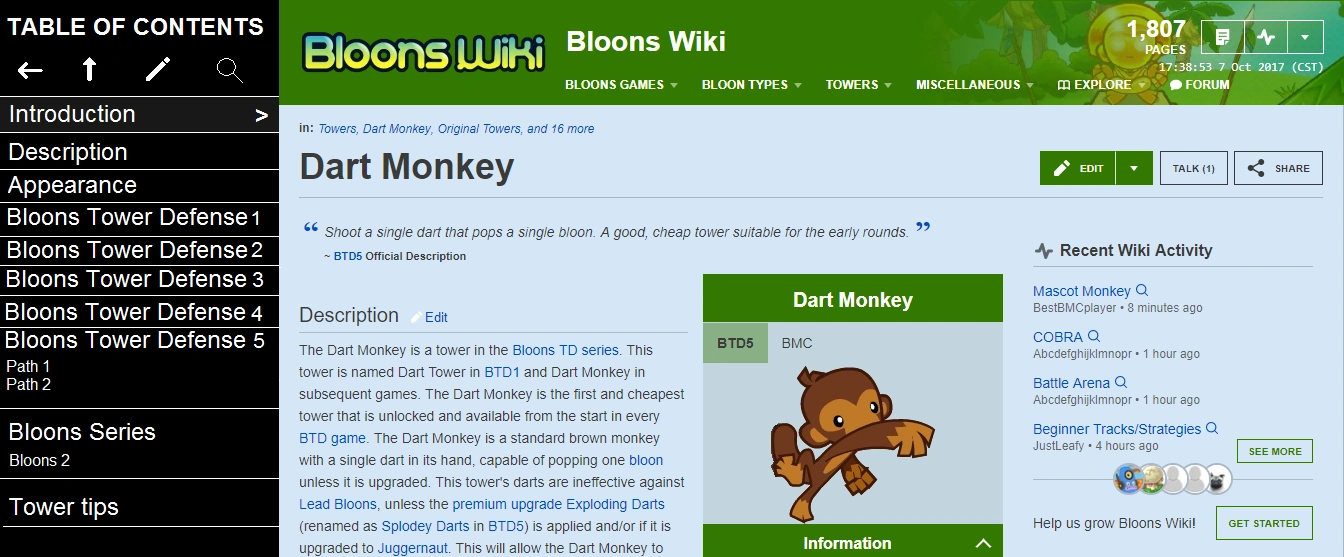
<p class="caption">This is pretty much my modernized way of the ToC.</p> </figcaption></figure></div>
<p>Alright, the modernized ToC has several details I will explain.
</p>
- There should be a ToC button between the Edit and the Comments (or Share) button (personal use). If it is used site-wide, it will be on the top of the article area, but under the article header. When clicking it, it will show the modernized ToC on the left side of the page. It will remove the background once the ToC is opened.
- The left arrow icon collapses the ToC itself and puts the ToC button back in the area of action buttons.
- The up arrow icon is a back to top button. It leads back to the top of the article.
- The edit icon leads to Special:ThemeDesigner. In the Theme Designer, there should be an extra color square exclusively for the ToC. It designs the background color of the ToC. This icon will only appear on users who are content moderators or admins in a specific wiki.
- If an article has a lot of headings (including sub-headings), the ToC itself is scrollable. It should have a MinimalScrollbar. When scrolling, the header of the ToC (its name and the tools) floats, which pretty much has the behavior of the Latest Discussions module in the Fan Feed.
- The "Introduction" heading is the first heading, found on all article pages.
- The background color of the section the user currently is in acts like the color of the WDS buttons on hover. The section heading in the ToC will have an arrow on the right.
- The search icon makes you find the name of a heading in a specific page.
<p>Hopefully something like this can be considerably made! It may require hard work, though, so if you are gonna start creating this script, good luck!
</p>
<h2><span class="mw-headline" id="FAQ"> FAQ </span></h2>
<p>
Why are you suggesting this?
</p><p><i>I want to redesign the ToC so it has fixed functionality, a clean design and is easier to use with additional tools.</i>
</p><p>
Would you want such a script to be available for site-wide or personal use?
</p><p><i>There is a possibility that it can be for site-wide, but it is recommended for personal use. It won't have an edit icon and the ToC button will be in the area of action buttons if it is used personally. If it is used site-wide, the edit icon will appear only to content moderators and admins, and the ToC button will be on the top of the article area, but under the article header.</i>
</p><p>
Would you recommend this to others?
</p><p><i>If this script becomes available, then I'd recommend it, especially if you do not like the current design and function of the ToC.</i>
</p><p>
We already have FloatingToc. Why create something very similar?
<i>This script actually has a huge difference between itself and FloatingToc. A good example being the fact that it stays on the left side, while FloatingToc can be put anywhere and can be expanded to any size. This is only one example, and there is still a lot of other differences.</i>
</p><p>
Is this JS or CSS?
</p><p><i>Obviously, it's JS.</i>
</p>
<h2><span class="mw-headline" id="Credits_to"> Credits to </span></h2>
- Wikiwand staff for inspiring me to create a similar ToC design.
- Bloons Wiki editors for having the "Dart Monkey" page.
- Original designer of FloatingToc for making me suggest a similar script with additional options.

 <figcaption> <p class="caption">This is the current Table of Contents.</p> </figcaption></figure></div>
<div class="center"><figure class="article-thumb tnone show-info-icon" style="width: 650px">
<figcaption> <p class="caption">This is the current Table of Contents.</p> </figcaption></figure></div>
<div class="center"><figure class="article-thumb tnone show-info-icon" style="width: 650px">
 <figcaption> <p class="caption">This is pretty much my modernized way of the ToC.</p> </figcaption></figure></div>
<p>Alright, the modernized ToC has several details I will explain.
</p>
<figcaption> <p class="caption">This is pretty much my modernized way of the ToC.</p> </figcaption></figure></div>
<p>Alright, the modernized ToC has several details I will explain.
</p>
