This is the talk page for discussing improvements to the MassEdit page.
- Please sign and date your posts by typing four tildes (
~~~~). - Put new text under old text. Click here to start a new topic.
- If you're new to the wiki, please take a look at the talk page help.
- Be polite
- Assume good faith
- Be welcoming
Further explanation
You said you have experienced bugs with AutoEditPages script so what exactly are these problems? And why do you set limit for input length if the only users can use this script are sysops? Thanks Dai ca superman (talk) 04:14, February 6, 2017 (UTC)
- AutoEditPages occasionally fails to work for me for undetermined reasons. Initially, I set input lengths because I did not wish to place too much strain on Wikia's servers or give users the ability to copy/paste the contents of Shakespeare's collected works into articles. I may remove this restriction. CoH ☎ 16:17, February 6, 2017 (UTC)
- On a slightly similar note, what does the super-long regex here provide security from? If you're looking to validate page names, perhaps you can use the much simpler
wgLegalTitleCharsMediaWiki variable? - OneTwoThreeFall talk 18:38, February 6, 2017 (UTC)- I hadn't realized that existed (it ain't on this page) or even that some of those characters were permitted in page titles. That's incredibly useful to know. Thanks OTTF. CoH ☎ 18:59, February 6, 2017 (UTC)
- No problem! There's a few variables available not listed on that page; I suppose people add entries in as needed or if they find them useful, rather than the list being generated directly from the source. - OneTwoThreeFall talk 11:34, February 7, 2017 (UTC)
- I hadn't realized that existed (it ain't on this page) or even that some of those characters were permitted in page titles. That's incredibly useful to know. Thanks OTTF. CoH ☎ 18:59, February 6, 2017 (UTC)
- On a slightly similar note, what does the super-long regex here provide security from? If you're looking to validate page names, perhaps you can use the much simpler
Activation
How do you activate the mass edit? What's the point in sleeping when you're already dead inside. 21:33, February 6, 2017 (UTC)
- You follow the installation instructions, then clear your cache. The button will appear on your toolbar on the bottom of the screen (if your selected skin is Monobook, the option will appear in the "toolbox" on the left). CoH ☎ 22:20, February 6, 2017 (UTC)
- Thanks for helping, but it was actually because you had to install it to the entire wiki's common.js for it to work. What's the point in sleeping when you're already dead inside. 17:56, February 7, 2017 (UTC)
Whatlinkshere
Hey, really great script here. I was just wondering if it was possible that this could be adapted to pull a list of articles from the Special:Whatlinkshere of a page, or from a category?--V Technobliterator TC 16:03, February 24, 2018 (UTC)
- At present, it cannot do that. But here's a trick for you: import MassNullEdit. It comes with an "Add Category Contents" button, which you can use and then copy and paste the results to MassEdit. It also auto-fills itself with pages on Whatlinkshere pages, so you do the same thing there. Hope that helps! Patrik 16:06, February 24, 2018 (UTC)
- Category support has been planned for a long time. I intend to include such an option in a future update. For now, you could use AutoEditPages to handle category contents. EIZEN (talk | contribs) 16:43, February 24, 2018 (UTC)
- Ahh, okay. AutoEditPages isn't really what I'm looking for as I need the find & replace function (and can't set up pywikibot on a Chromebook), but MassNullEdit will probably work.--V Technobliterator TC 22:36, February 24, 2018 (UTC)
No line break
Between the Examples in the placeholder box there is no line break. It says "Example 1Example 2Example 3". --  Barbar (talk) 18:25, March 13, 2018 (UTC)
- I'm guessing you're referring to this page or something similar. It's not a big deal, since the placeholder displays properly in the modal itself. EIZEN (talk | contribs) 00:12, March 14, 2018 (UTC)
Suggestion: Summary
Instead of having a set summary in the configurations for all edits, could another textarea be added, with a custom summary?—|| Grudgeholderr ||— 06:19, May 20, 2018 (UTC)
- That's not a bad idea. I'll implement that this week. EIZEN (talk • contribs) 15:52, May 20, 2018 (UTC)
Bug
Searching a namespace only returns the first 500 pages.—|| Grudgeholderr ||— 06:08, June 4, 2018 (UTC)
- That is not a bug, as stated on the doc page. EIZEN (Talk) 09:55, June 4, 2018 (UTC)
- Ah, sorry, didn't see that.—|| Grudgeholderr ||— 10:13, June 4, 2018 (UTC)
- Is there anyway to bypass this, or edit pages past the first 500?—|| Grudgeholderr ||— 03:57, September 19, 2018 (UTC)
- Import MassNullEdit and use its new "Add Pages" feature. Copy-paste the list you generate into MassEdit. Patrik 14:38, September 19, 2018 (UTC)
- Thank you very much!—|| Grudgeholderr ||— 05:21, September 21, 2018 (UTC)
- Import MassNullEdit and use its new "Add Pages" feature. Copy-paste the list you generate into MassEdit. Patrik 14:38, September 19, 2018 (UTC)
- Is there anyway to bypass this, or edit pages past the first 500?—|| Grudgeholderr ||— 03:57, September 19, 2018 (UTC)
- Ah, sorry, didn't see that.—|| Grudgeholderr ||— 10:13, June 4, 2018 (UTC)
NOT WORKING!!!
Mass Edit not working. Please fix. —Preceding unsigned comment added by Dan And Dan (talk • contribs) . Please sign your posts with ~~~~!
My Tools
Up until about a week or so ago, MassEdit was located under 'My Tools' on the tool bar. Now, it's just on the tool bar, and I'm not a fan of it. Is there any way I can configure it to go back under 'My Tools'? Killer kev (talk) 20:40, September 27, 2019 (UTC)
-
You can configure the element's placement however you wish by including a
windowconfig object and one of Placement.js' list of approved element locations. For the tools menu, that would be the following:EIZEN (Talk) 22:45, September 27, 2019 (UTC)window.MassEditConfig = { placement: { element: "tools", type: "prepend" } };
Update Error?
20-09-19: Addition of functionality to replace only specific occurrences of a replacement target; addition of case sensitive/insensitive matching for find-and-replace; minor code alterations
Ever since this update I find the extended options with "find and replace" just create more errors and mistakes. My usual use of the feature was simple and straight forward enough and yet it breaks my pages every attempt. Is this an error or is this feature so convoluted to use you cannot use "find and replace" feature with out a guide book? Hollowness 07:17, October 3, 2019 (UTC)
- The implementation of more nuanced find-and-replace functionality is by far the most requested feature I've been asked to add to the script. Under present circumstances, I've received no complaints from users who've tested the feature and none of my own tests have resulted in errors. EIZEN (Talk) 09:41, October 3, 2019 (UTC)
- Update: I have uncovered a bug related to replacing text containing special characters like
[[. It has been temporarily patched, pending Staff approval. Subsequent tweaks to the find-and-replace functionality will precede the next upcoming major update to the script. EIZEN (Talk) 16:02, October 3, 2019 (UTC)- I should have given details instead of a general complaint statement but I couldn't figure exactly the issue (besides an error/bug or it was user error because the update wasn't for the laymen). However, "special characters like
[[" explains it completely- for I was adding categories. I look forward to the feature working as intended with more functionality. Hollowness 21:37, October 3, 2019 (UTC)
- I should have given details instead of a general complaint statement but I couldn't figure exactly the issue (besides an error/bug or it was user error because the update wasn't for the laymen). However, "special characters like
wgLegalTitleChars
When I try to mass edit a bunch of pages, the same error shows up: Error: Use of some characters is prohibited by wgLegalTitleChars. Can you help me and what is wrong???
TheSURVIVR (talk) 01:50, October 18, 2019 (UTC)
- That error is thrown in three cases: if you are messaging and your message title contains illegal characters, if you are editing and your page/category titles contain illegal characters, or if you are editing by namespace and your namespace entries are not integers. EIZEN (Talk) 09:45, October 18, 2019 (UTC)
Instances
How do I use this on mass edit. Dominic1743 (talk) 17:44, December 18, 2019 (UTC)
- To quote the relevant placeholder text: "
Enter '1, 3' to replace 1st and 3rd instances, etc." EIZEN (Talk) 20:00, December 18, 2019 (UTC)
Query Continue and UCP
Just a FYI. This script may break when the upcoming Unified Community Platform (UCP) arrives as query continue semantics have changed in the latest MediaWiki version. Easiest fix is to add the rawcontinue parameter to the appropriate queries to force the use of the current query continue response. Aspallar (talk) 18:31, December 27, 2019 (UTC)
Permissions
Hello, I would suggest an option for administrators to set the user group requirements for this script on their wiki. The permissions configuration would be as follows:
/* Editing Permissions */
window.MassEdit.editRequiredGroups = [
    "sysop",
    "bureaucrat",
    "rollback",
    "content-moderator",
    "vstf",
];
/* Messaging Permissions */
window.MassEdit.messageRequiredGroups = [
    "global-discussions-moderator",
    "threadmoderator",
];
—Preceding unsigned comment added by Thundercraft5 (talk • contribs) 12:04 AM Jun 12 (Fri) 2020. Please sign your posts with ~~~~!
- Might be better if you merged it into the already existing settings object rather than creating your own. --Little Red 22:59, June 22, 2020 (UTC)
- Your proposed schema leaves the door open to abuse. As site JS is minified and loaded prior to personal JS, a user could sidestep custom usage restrictions by simply redefining
window.dev.massEdit.editRequiredGroupsin a local JS page. MassEdit only checks for user rights permissions once the user initializes the operation via a relevant button click, meaning that such redefinition could occur long before usage of the script. This sort of idea would really only work if site admins invokedObject.definePropertyonwindow.dev.massEdit, set the values of the descriptor'swritableandconfigurableproperties foreditRequiredGroupstofalse, and wrapped the value of thevaluedescriptor property in anObject.freezeinvocation to prevent mutation. This approach would forbid permanent redefinition of the permissible user groups property, but at the cost of many moving parts and verbose code. I might eventually add custom user group functionality of some sort, but I first need to develop a better way to ensure admin-approved usergroups cannot be locally redefined. At the present time, such functionality is not on my list of high-priority updates meriting timely inclusion. EIZEN (Talk) 23:35, June 22, 2020 (UTC)- Thanks for considering adding this!
- Your proposed schema leaves the door open to abuse. As site JS is minified and loaded prior to personal JS, a user could sidestep custom usage restrictions by simply redefining


Error?
I am admin on several wikis but all of them now don't have MassEdit after the recent update. I only have mass categorization, don't know why. Nobody changed the ImportJS. If you can't fix it, please revert to the last version. Thanks for this useful code! --Woods234 13:54, July 3, 2020 (UTC)
- Yeah, there was/is a bug. I submitted a quick patch to ensure the script works on 1.19 wikis until I can refactor the dependency loader to my liking. The script should reappear on the toolbar once the fix is approved by Staff. EIZEN (Talk) 16:13, July 3, 2020 (UTC)
- Seems it has not been approved by staff because it does not appear in toolbar. Hope I can use it soon. --Woods234 08:32, July 4, 2020 (UTC)
- For future reference regarding your edit here, please avoid unilaterally reverting the script back to an earlier commit without consultation. Such reversions will not hasten the JS content review process, as a member of Staff will still need to review any and all changes made to the script before they can go live. The quick patch I submitted previously will likely be reviewed early next week, though I intend to have a revised dependency loader debuted before then that will hopefully address the issue more permanently. Until the main branch has been repaired, I recommend you copy/paste an earlier version of the script to a local
wikia.jsfile. EIZEN (Talk) 00:55, July 5, 2020 (UTC)
- For future reference regarding your edit here, please avoid unilaterally reverting the script back to an earlier commit without consultation. Such reversions will not hasten the JS content review process, as a member of Staff will still need to review any and all changes made to the script before they can go live. The quick patch I submitted previously will likely be reviewed early next week, though I intend to have a revised dependency loader debuted before then that will hopefully address the issue more permanently. Until the main branch has been repaired, I recommend you copy/paste an earlier version of the script to a local
- Seems it has not been approved by staff because it does not appear in toolbar. Hope I can use it soon. --Woods234 08:32, July 4, 2020 (UTC)
Error on UCP
When importing MassEdit on a UCP wiki that doesn't have talk pages, an error is thrown because MassEdit doesn't handle the rejection from wgMessageWallsExist. --Sophie 05:26, October 13, 2020 (UTC)
- I can't seem to replicate any such error; the script runs fine for me on Message Wall-equipped UCP wikis. Can you provide more details of what you're encountering? EIZEN (talk) 09:30, October 13, 2020 (UTC)
Not working
I'm currently using Mass Rename, Batch Delete, Multi Upload, Mass Categorization on my personal JS but Mass Edit is the only one that doesn't work. If I put Mass Edit on before any of those first four scripts I've mentioned, the following scripts won't work. I've moved Mass Edit on global JS but still it's not working. meatgrind89 10:58, October 16, 2020 (UTC)
- The fix for this was introduced two days ago, but has not yet been approved by Staff. EIZEN (talk) 12:30, October 16, 2020 (UTC)
- Oh, so still pending.. Best I can do is wait, I guess. The script should appear in My Tools once the revision got approved, right? meatgrind89 12:52, October 16, 2020 (UTC)
Suggestion
Allow for the input fields to be edited when paused so they don't all have to be re-entered if you notice a tiny mistake in your input while running the script. Also, I would prefer for the fields to not automatically be cleared after canceling or finishing edits. After all, there already is a button for clearing all fields. Psy Guy (talk) 21:21, October 16, 2020 (UTC)
UCP Comments
When using this on UCP, it protects each page it edits so that only admins can comment. — Killer Kev 02:19, October 20, 2020 (UTC)
- This is a bug endemic to the UCP for which I have submitted a Zendesk report, not a problem with MassEdit itself. On UCP wikis, attempts by users with the sysops user right to edit pages with extant article comments using the MediaWiki API result in the comment section being indefinitely protected. This holds true for even the simplest snippets of code that make
POSTrequests via vanilla API endpoints to prepend or append plaintext. EIZEN (talk) 10:49, October 20, 2020 (UTC)- Can't the article comments section just be reenabled manually by an Administrator? That may be a solution in the short run if that's the case. In the long run, the bug will of course need to be fixed. ― C.Syde (talk | contribs) 11:03, October 20, 2020 (UTC)
- As far as I can tell from testing the issue on my UCP test wiki, no. The action is publicly logged in the Protection log as
[Commenting=Allow only administrators], but the sysops right lacks sufficient privileges to adjust the comment section protection level. The only options available for me on the "Change protection level" page are the standard "Edit" and "Move" actions. EIZEN (talk) 11:27, October 20, 2020 (UTC)- There shouldn't be any usergroups with the permission to adjust the comment section protection level. But since not everything from Discussions has been listed on the Special:ListGroupRights page - due to not being part of MediaWiki - I could be wrong in assuming that such an option isn't possible. ― C.Syde (talk | contribs) 11:43, October 20, 2020 (UTC)
- Allowing commenting is done through the edit screen, not the protection screen, which is where this API bug comes from. It can also be done via the (undocumented)
wpIsCommentingEnabledparameter in the edit API, but setting that tofalsewould just unprotect comment sections on all edited pages. -- Cube-shaped garbage can 11:47, October 20, 2020 (UTC)
- Allowing commenting is done through the edit screen, not the protection screen, which is where this API bug comes from. It can also be done via the (undocumented)
- There shouldn't be any usergroups with the permission to adjust the comment section protection level. But since not everything from Discussions has been listed on the Special:ListGroupRights page - due to not being part of MediaWiki - I could be wrong in assuming that such an option isn't possible. ― C.Syde (talk | contribs) 11:43, October 20, 2020 (UTC)
- As far as I can tell from testing the issue on my UCP test wiki, no. The action is publicly logged in the Protection log as
- Can't the article comments section just be reenabled manually by an Administrator? That may be a solution in the short run if that's the case. In the long run, the bug will of course need to be fixed. ― C.Syde (talk | contribs) 11:03, October 20, 2020 (UTC)
I've submitted a quick patch that should address the root issue while preserving cases of intentional comment section protection. Cheers to Cube for pointing out the undoc'ed parameter. EIZEN (talk) 14:19, October 20, 2020 (UTC)
- That is much appreciated, EIZEN. Thanks for getting to it so fast. @C.Syde, to answer your question, yes, the article comments section can be reenabled manually by an Administrator. But having to go behind and do that with each paged edit just isn't feasible and makes MassEdit more trouble than its worth. — Killer Kev 18:31, October 24, 2020 (UTC)
Just wanted to say that I went to use this tool today and I ended up having to re-enable the comments 1 by 1 in 94 pages, so just letting you know whatever Fandom changed in the meantime broke your fix TheGhostOfInky (talk) 00:23, December 26, 2020 (UTC)
InvalidArgumentException
Mass edit doesn't seem to show up on our wiki toolbar even though we have it re-installed it.
Neetohh (talk) 11:13, November 5, 2020 (UTC)
- This isn't a problem with MassEdit. Several of your imports, including MassEdit and AjaxBatchDelete, are encountering
InvalidArgumentExceptionerrors all timestamped to the 3rd of November that are being thrown in your imports' attempts to load necessary external dependencies like Colors and I18n-js, hence why your imports are not appearing on the toolbar. EIZEN (talk) 12:51, November 5, 2020 (UTC)
MassUpload
Is there MassUpload tool? --Marcy (talk) 07:07, November 7, 2020 (UTC)
- Non-UCP wikis had Special:MultipleUpload, in UCP wikis you can mass upload right from the editor in any page (the icon is an arrow pointing up) --Lgcfm (talk) 14:29, November 12, 2020 (UTC)
Loading
On one site, the MassEdit loads correctly. On the other, it doesn't, and I'm not sure what I am doing incorrectly. Says "Uncaught ReferenceError: importArticles is not defined" Energy × 20:56, November 22, 2020 (UTC)
- There is a Fandom-side bug affecting all
importArticlesinvocations on UCP wikis at the moment. Until such time as the issue is rectified, I would recommend you import the script locally viamw.loader.loador site-wide viaMediaWiki:ImportJS. EIZEN (talk) 21:45, November 22, 2020 (UTC)
Using MassEdit to remove File:Placeholder
I was attempting to use MassEdit to remove File:Placeholder from all user profiles on a wiki, and while it worked for most profiles, I noticed that it messes with profiles that were created automatically with script (such as with dev:AutoCreateUserPages.js), even if File:Placeholder was not on the profile.
For example, the script did this to my profile and this to a staff member's profile. How can I use MassEdit to remove File:Placeholder from profiles, without messing up profiles that were created with scripts (that also do not have "File:Placeholder" on them)? Thanks. Jeminali (talk) 09:24, January 28, 2021 (UTC)
- Without more information concerning the specific settings you used in each of the various dropdowns and fields, I can't accurately diagnose this behavior. In the handful of test cases I attempted, the use of
[[File:Placeholder|thumb|220px]]as the target content and an empty string as the new content produced no such errors on userpages exhibiting interwiki transclusions. EIZEN (talk) 11:12, January 28, 2021 (UTC)
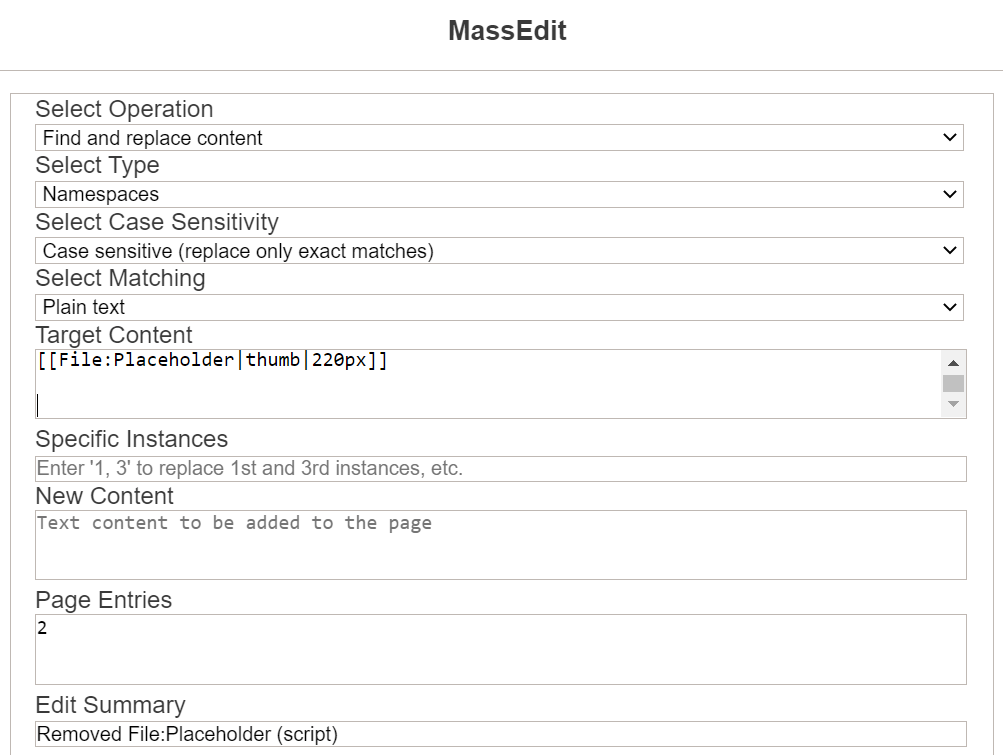

- This is what I did:
- Note: I typed in 2 empty lines after
[[File:Placeholder|thumb|220px]]so that the profiles wouldn't end up with 2 empty lines at the top. Jeminali (talk) 12:46, 28 January 2021 (UTC)- I ran some tests in MassEdit's debug mode using your settings on both manually created and automatically generated userpages and on userpages that transclude their contents from Community Central. I was unable to replicate this error; the script worked as expected in all cases and the debug data yielded no new insights. I'll keep poking around, but if you encounter the error again, the best way to help diagnose would be to open your browser console on the page running MassEdit and post any MassEdit-related errors here. EIZEN (talk) 23:36, 28 January 2021 (UTC)
MassDelete ?
Hello,
Would it be possible to add a feature to massively delete pages, files, templates, etc... with this script?
Thank you in advance.
Regards,
(talk | contribs) 19:17, 10 February 2021 (UTC)
- See AjaxBatchDelete. EIZEN (talk) 19:25, 10 February 2021 (UTC)
How to access
How do I access it?Chromeify (message wall) (contribs) 17:36, 20 February 2021 (UTC)
- It will appear on your toolbar in the "My Tools" menu by default, though its positioning is configurable to any of the default locations supported by Placement. EIZEN (talk) 18:29, 20 February 2021 (UTC)
Parameters
When installing it for a wiki, is it possible to limit the amount the users who can use MassEdit(e.g. depending on their edit count, how long they've been on the wiki, user group) Printer89 (talk) 16:55, 17 March 2021 (UTC)
- The majority of its base functionality (apart from "Generate page listing") is already limited to user groups that possess the permissions necessary to edit and delete pages or threads. As for the rest, no. I suppose you could add some code to a
MediaWiki:Wikia.jsfile that couches an importation of the script within the body of anifstatement to ensure the script is only loaded sitewide when certain conditions are met, but users could bypass such restrictions by importing the script locally in their personal wikia.js files. EIZEN (talk) 18:42, 17 March 2021 (UTC)
Send a message to several users feature
Hello, I don't know if you've noticed, but the "send a message to several users" feature is not working anymore. Is it possible to fix this? Have a nice day, Soronos (discussion) 18:23, 27 March 2021 (UTC)
- It's very possible to fix this, but it's not a high-priority issue at present. From the discussion previously hosted here, it seems Wikia's JS reviewers aren't particularly fond of scripts featuring mass-messaging functionality, due to the potential for widespread abuse in the form of spam. As such, I've designated the UCPification of MassEdit's messaging functionality as a low-priority fix until further notice, though the functionality likely still works on UCP wikis equipped with conventional user talk pages. EIZEN (talk) 00:46, 28 March 2021 (UTC)
- Okay, it's a shame because it would be a big help for me to develop my wiki, but I understand. I hope this will be fixed soon anyway! Soronos (discussion) 12:58, 10 April 2021 (UTC)
New to MassEdit, need help
I'm new to using MassEdit and I don't understand the "Select Type" field. Select type of what? Can someone explain this to me? ComicalNinja [Talk] 20:53, 8 April 2021 (UTC)
- That dropdown refers to the type of entries you wish to input in the "Page Entries" textarea further down in the UI. You can input a list of loose pages by selecting the "Loose pages" dropdown option, or you can include the names of categories/namespaces whose member articles you wish to edit in bulk by selecting the "Categories" or "Namespaces" dropdown options, respectively. EIZEN (talk) 21:21, 8 April 2021 (UTC)
- How can I apply it to all pages across the wiki? ComicalNinja ( talk) 20:51, 27 April 2021 (UTC)
- Depends on what you mean by "pages." Do you mean mainspace articles only, or are you including templates, file descriptions, categories, etc. in there as well? Depending on your answer, you can include a newline-delimited listing of all the relevant namespace numbers in the "Page Entries" textbox. EIZEN (talk) 23:36, 27 April 2021 (UTC)
- How can I apply it to all pages across the wiki? ComicalNinja ( talk) 20:51, 27 April 2021 (UTC)
{{}}, Ilegal character?
When I've tried to use MassEdit, I writed as content add the template lua, and when I've tried to add the
{{Lua|Module:Ahnentafel}}appears me the following content:
Error: Use of some characters are prohibited by wgLegalTitleChars. Can any help me?
Impostor7804 :p - 17:22, 22 April 2021 (UTC -5)
- That message is only thrown when the title of either a page/category included in the "Page Entries" textbox or a user talk message contains improper characters not found in the
wgLegalTitleCharswindow property. The transclusion of a template is not causing this issue. I recommend you recheck the titles of your target pages and see which one(s) use characters forbidden by the aforementioned window property. EIZEN (talk) 23:36, 27 April 2021 (UTC)
Invalid user rights group error.
Whenever I use this, I get an invalid user rights group error. I am able to edit the articles that I inputted, but massedit doesn't work. Any help? --Jalenluorion (talk) 23:23, 19 June 2021 (UTC)
- As the error implies, the script may only be used by local staff in the correct user rights group. To quote the documentation page, "[d]ue to the potential for abuse in the form of vandalism or spam, the application can only be used by high-level local staff (i.e. admins, moderators, and bots) and assorted global groups." The only aspect of MassEdit that is available for use by all users is the category member generation functionality. EIZEN (talk) 23:57, 19 June 2021 (UTC)
Removing the Entire Line Something is On
Hello,
When I try to use the script to remove a category (i.e., find [[Category:Name]] and replace with nothing) this does remove the category but leaves behind an empty line. Is there a way to have it also remove the line the category is on, assuming that the category is the only thing on the line? I know I could have it search for
]]
[[Category:Name]]
[[
and have it replace it with
]]
[[
or do something similar without the brackets at the top or bottom but I would like to only run the script once instead of running it three times to account for it being on the top, middle, or bottom, of the categories list. CAMERAwMUSTACHE (talk) 21:46, 21 July 2021 (UTC)
- Best way to do that is to select the "Regular expressions" option in the "Select Matching" dropdown menu and format your "Target Content" input as
\[\[Category:Name\]\]\n. The inclusion of the\nnewline character at the end of the expression removes the line break with the category itself whenever the target is found in the page content. EIZEN (talk) 22:50, 21 July 2021 (UTC)
Bug
Hey! When using the script, I came across one bug. If you change the --theme-accent-color variable in your personal CSS, then the script will not appear in the My Tools menu. Example: w:c:ru.stakler:User:DecabristM/fandomdesktop.css. The message was translated from Russian into English using google translator. С уважением, DecabristM (обс. | вклад) 04:14, 13 August 2021 (UTC)
- The bug lay with Colors, one of MassEdit's external dependencies, not with MassEdit itself. I've applied a fix to Colors to address this behavior; once that's approved, MassEdit should reappear on the toolbar. EIZEN (talk) 09:34, 13 August 2021 (UTC)
- Thank you! — DecabristM (вклад / обс.) 03:15, 17 August 2021 (UTC)
Suggestion: Add presets
I've got a cool suggestion for this script, presets. The feature would add a new configuration variable that would contain a list of presets a user could choose from, automatically filling the form fields from options from the configuration variable. I know this would be complicated to add, but it would make using this script alot faster for advanced users. Example code of the configuration variable:
window.MassEdit = {
	presets: [{
		name: "Remove __NOINDEX__",
		id: "remove-noindex",
		operation: "find-and-replace",
		formFields: {
			pageListType: "loose",
			matching: "regex",
			caseSensitive: false,
			targetContent: "__NOINDEX__",
			newContent: null,
			specificInstances: [1, 2, 3],
			summary: "Removing __NOINDEX__"
			pages: [
				"One",
				"Two",
				"Three",
			],
		},
	}],
};
- I've thought about doing that. Under present circumstances, my primary focus is cleaning up ME's codebase and reinstituting its mass-messaging functionality, but I'll keep this suggestion in mind for future improvement updates. EIZEN (talk) 09:26, 22 August 2021 (UTC)
Adding infobox section using MassEdit
Hello, is it possible to add a section within an infobox through the MassEdit tool? Thehumilator23 (talk) 16:19, May 23, 2022 (UTC)
Missing preview button and regex questions
- Does regex support capture groups? I want to find \{\{oldstuff|name|(.*)|data\}\} and replace it with \{\{newstuff|$1\}\}
- The preview button is missing most of the times I launch massEdit which is frustrating.
Ryobot (talk) 22:37, 24 May 2022 (UTC)
Using MassEdit to remove Category from multiple files/pages
Hi! I noticed how there is no way to remove/replace a Category from multiple files/pages while using MassEdit...
For example: I have 550 image files that are in 2 categories (let's say Category A and Category B) and I want to remove them from Category B.
I thought I could do a "work around" by placing Category A and Category B in the targeted content field box and placing Category A in the new content field box. In theory, that would remove both categories and add Category A back to the images but that doesn't seem to work.
Is there any way at all to do this without going through 550 image file pages?
FraeBot (talk) 22:27, 31 August 2022 (UTC)
- Yes, see MassCategorization. Polymeric (talk) 01:46, 1 September 2022 (UTC)
- If I understand you correctly, you can just include "
[[Category:Category B]]" in the "Target Content" textarea and leave the "New Content" field blank. The script will look for the category in the page wikitext and replace it with an empty string if found. This is typically the way I remove categories from pages. EIZEN (talk) 13:44, 1 September 2022 (UTC)
Regex with $
Hello,
If there is a "$" in the regex, the script use $1 as "$1" and not as the first regex.
In my case, I want to find
\| ([\wÀ-ž']+) = ([\wÀ-ž(\)\[\]{}/#\ \-\.&"\|="«»',:\?\+\$<>]*)([\n])}}
to remplace by
| $1 = $2$3| Null = $3}}
When there is no "$" on page like this one, there is no problem, but on a page with $, the script doesn't work.
Thegamer1604 (Discussion) 19:02, 2 November 2022 (UTC)
- Terribly late reply, but just in case you haven't found the solution yet, here it is: enter your target content as
\| ([\w\W]+) = ([\w\W]*)[\n]}}
- and enter your new content as
| $1 = $2
| Null =
}}
- That should work even when a dollar sign appears. Hope this was helpful! Mr. Starfleet Command (talk • contribs) 13:42, 26 December 2023 (UTC)
Bug found
Hello. I recently installed MassEdit to RangerWiki, but the bot sometimes causes us to have to input pages we need to massedit more than once despite us inputting them correctly. Is there a way to correct this or is this a known problem? Thanks. Rgiacobbi1 (talk) 20:21, 29 November 2022 (UTC)
Instanced, but explained
How does the instances part work, I know someone already asked the same thing, but i want an explanation of how it actually works instead of the placeholder text copy pasted. thx TAYPIKO • ✉ • ⌨ 14:34, 15 December 2022 (UTC)
Editting Out Categories
Hi, I have recently added the MassEdit feature o a wiki I have adminship over and have been intending for it to use to remove a category we have deleted from multiple pages but have had bit of a struggle on. Can anyone guide me through the process?The Pro-Wrestler (talk) 13:23, 25 January 2023 (UTC)
- If you're trying to mass add/remove/replace categories that are placed directly on the page, I would suggest trying MassCategorization instead. If these categories are added via transclusion (e.g. from a template) and the template doesn't apply the category anymore, simply go to the category page and MassNullEdit if the category still lists pages that shouldn't be there. --BryghtShadow (talk) 13:49, 25 January 2023 (UTC)
Editing All Pages
Hi, is there a way for MassEdit to recognise that I want it to perform the same action on every single page on a Wiki, without having to manually input every single page title as a loose page? Thanks. SFCJack (talk) 13:13, 9 February 2023 (UTC)
- You can use the "Namespace" option to selectively target specific namespaces to edit in bulk. For example, if you wanted the script to edit each and every mainspace article and Project page existing on the wiki, you would select "Namespaces" in the "Select Type" dropdown and input
0and4on separate lines in the "Page Entries" textarea. A list of namespace IDs may be found here. EIZEN (talk) 15:28, 9 February 2023 (UTC)
Trying to add IMAGE category to files
I mass uploaded a few hundred pictures to my wiki but they ended up without being tagged as IMAGES. How do I add this category to them using MassEdit.
This is what I used because it seemed logical:
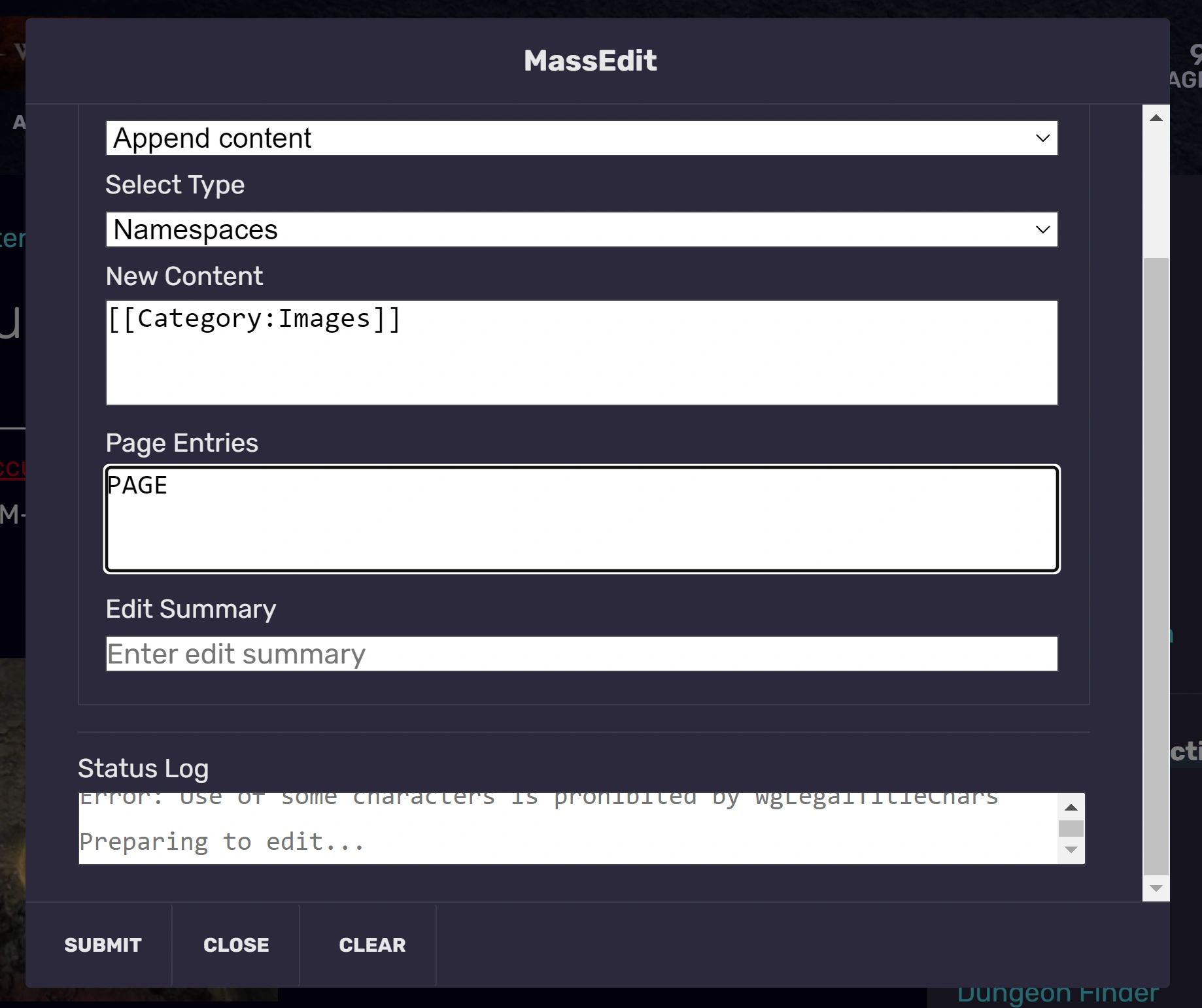

Parameters I used
and there was no example screen to follow. Fablanta (talk) 01:54, 2 May 2023 (UTC)
- If you intend to edit by namespace, you need to provide the ID of the namespace you wish to edit. In the case of images, that is
6. However, editing by namespace will append the category to every image on the wiki, including those that are already tagged with the category. You will need to edit the namespace contents again using the find-and-replace tool to target and remove the second instance of the category from older files that have been categorized twice. EIZEN (talk) 23:42, 2 May 2023 (UTC)
- Thank you. Namespaces are numbers. Who would have guessed.
- I tried it again changing PAGE (which should logically been FILE but I'm blaming being tired when prepping the screencap) to 6 in the Page Entries field. It failed again due to some type of access error. I then closed all tabs listing images (ordinary tabs with images displayed were left open).
- I was then able to run MassEdit successfully. Only 3 files were tagged as image before now 370 are. For the files that were already in the category, editing in source mode does show a repetition of the category statement but the file page as displayed only shows "Category: Images" once, so I can live with that. Next time I run this I will have to find some way to target only Uncategorised files.
- Fablanta (talk) 19:20, 3 May 2023 (UTC)
Select Matching question
In the dropdown for "Select Matching" it gives two options "Plain text" and "Regular expressions." Can someone please explain what do they do?--Tamirobson (talk) 02:01, 24 June 2023 (UTC)
- In simple terms, the "Plain text" option is exactly as it sounds; it takes the raw text the user inputs in the textarea and looks for an exact match in the content of the target pages. Regular expressions allow for a bit more dynamic control over pattern matching but require more coding knowledge to use; see here for an overview of the subject matter. In most cases, "Plain text" is sufficient for most mass-editing purposes, since most users are simply looking to replace a very specific bit of text. EIZEN (talk) 13:29, 24 June 2023 (UTC)
How to edit multiple things at once
I am trying to edit multiple strings of text (file names) on a single page at the same time, is there a way to do this? I tried separating with a line break (Shift+Enter) in the target content and new content fields but it doesn't work. I thought it would be the same as the Mass Rename tool where you can have multiple entries at once. Thanks in advance! Handofthesly (talk) 05:15, 16 January 2024 (UTC)
- MassEdit was only designed to replace one target per page. The reason your Shift+Enter method failed is because the script assumed your line break was part of the target/replacement text, which may include line breaks, wikitext, and HTML. Multi-target replacement and more involved automated editing should be undertaken using dedicated bot software like Pywikibot or AutoWikiBrowser.
That said, it is technically possible to find and replace multiple different targets at once in MassEdit using regex, but it requires that the target file names consistently appear the same number of times in the exact same order for each page. As a quick example, if you know for certain that[[File:OldName1.png|250px]]always precedes[[File:OldName2.png|250px]]somewhere in the wikitext of each page and both OldName1 and OldName2 only appear once each per page, you could replace both simultaneously with something like\[\[File\:OldName1\.png\|?([^\]]*)\]\]([^]*)\[\[File\:OldName2\.png\|?([^\]]*)\]\]and[[File:NewName1.png|$1]]$2[[File:NewName2.png|$3]]. It's janky, but it does technically work.
However, for more dynamic cases in which multiple file names could appear an indeterminate number of times in any order, the answer is no. It's certainly possible to make it work in general by passing a function toString.prototype.replacethat maps each target to its desired replacement, but it's not presently possible in MassEdit given the script's one-target-per-page design ethos and the resultant way I wrote thereplaceOccurrenceshandler. EIZEN (talk) 22:29, 16 January 2024 (UTC)
Just Find Feature
I was wondering if it would be possible to add a feature that just finds and does not replace the content. We have a lot of image files that should have a "Credit" section, but sometimes people forget to add it. I'm trying to figure out which pages in a list of all my images are missing the "Credit" keyword so I can easily go and add it in without having to check every page manually.
Not sure if it would be more useful under the "Generate page listings" operation. It currently works only for Categories, Namespaces, and Templates. It could maybe be extended to look for strings? Or it can just be the "Find and replace content" operation without the replace content part.
Let me know if I'm missing something or if there's another script out there that can solve my issue. Thanks! -Ray808080 (talk) 23:49, 6 March 2024 (UTC)
Namespaces do not work
I have tried numerous times to enter 0 as a value for "Page Entries," but it always just errors with "Error: 0 not edited. Please try again."
DigitalKandra/DK - Message Wall | Guestbook | Fandom Stars member QOTD: “It's okay if you fall down and lose your spark. Just make sure that when you get back up, you rise as the whole damn fire.” – Colette Werden (old quotes)
17:55, 12 May 2024 (UTC)
- You received that error message because you probably selected "Loose Pages" rather than "Namespaces" from the "Select Type" dropdown. That error message is typically displayed when the script attempts to edit a nonexistent loose page whose title is supplied in the "Page Entries" textarea. I just tested the namespace-editing functionality on my test wiki and it works properly as expected. EIZEN (talk) 08:39, 13 May 2024 (UTC)
Message users messages does not trigger a notification
I'm not sure what the issue is, but when a user is messaged with the message user fnctino onf this script they do not reive a notification.
DigitalKandra/DK - Message Wall | Guestbook | Fandom Stars member QOTD: “It's okay if you fall down and lose your spark. Just make sure that when you get back up, you rise as the whole damn fire.” – Colette Werden (old quotes)
18:05, 12 May 2024 (UTC)
- I tested the messaging functionality on my test wiki using a secondary test account as the recipient and encountered no such issue—a notification was generated for the message recipient in all cases, with Message Walls both enabled and disabled. Be aware that the script will only message users who are active contributors to the wiki on which the script is being used. EIZEN (talk) 08:39, 13 May 2024 (UTC)
Finding the toolbar
For anyone who still can't find MassEdit, click the wrench icon on the bottom right.
I closed the toolbar three years ago and entirely forgot it existed. Just leaving a note here in case anyone else hasn't gotten enough sleep (lol) Lapslock (talk) 14:57, 7 October 2024 (UTC)
Main namespace & redirects
Today I used MassEdit to run over all main namespace articles to catch and correct some common typo. That's when I realized that the script also checks all redirect pages when namespace is set to "0". Is there a way to avoid this? We have over 1200 redirects, so running it on namespace 0 takes much longer than needed when these redirect pages are all included in the scan.
Oot42 • Hi Bob! • 💬 17:34, 7 November 2024 (UTC)
- I've added an additional dropdown menu to the modal permitting the filtering of redirects from namespace results. When mass-editing namespaces, you may now choose to exclude redirects, include redirects alongside content pages, or edit redirects exclusively. You will likely need to clear your browser cache/localStorage in order to see the "Filter" dropdown and its i18n text appear in the script modal window, given that the modal contents are cached. Depending on when you see this reply, you may also need to await Staff's approval of my script edits for the changes to take effect.
I've conducted some minor batch testing of the changes and encountered no errors or bugs, but please reach out if you do experience any issues and I will attempt to diagnose the problem and submit corrective edits. My recommendation would be to first test the redirect-filtering functionality by means of MassEdit's "Generate page listing" tool before you attempt to edit. This way you'll be able to test and see if the script can generate a namespace member listing that correctly excludes the 1200+ redirects you mentioned previously. Cheers! EIZEN (talk) 16:04, 8 November 2024 (UTC)
Wildcards
Are wildcards possible in the search/target content field? low key the best extension on devwiki btw ty Lapslock (talk) 22:06, 8 November 2024 (UTC)
Would it be possible to add a Find and Locate Feature?
So one of the functionalities of this tool is "generate page listings" but you're limited to categories, namespaces, and templates. Would it be possible to have this tool generate a list of pages containing custom strings? I feel like it shouldn't be too hard. Basically, just like how the "Find and Replace" goes through all the pages you input, finds pages containing your string, and then edits every page containing your string, have it do the same thing but instead of "edit" it adds it to a list to generates a list of the pages it would have edited.
Is something like that possible? I feel like it would be extremely useful when you need to mass edit things that can't be fixed by a simple find and replace but you still need to find the pages. Because currently the only option is to:
- Find and replace a minor change
- See which pages you just edited
- Now you have a list of all pages containing your string and can manually fix them.
Just need to cut out the middle man, so-to-speak. BlackDragon 21:37, 8 December 2024 (UTC)
- This feature has been suggested before and will be implemented in the near future. EIZEN (talk) 22:06, 8 December 2024 (UTC)
More Settings for Find & Replace Feature
I love using MassEdit, but the issue is that it occasionally edits things incorrectly for a number of reasons and we'd need to find a way to undo the incorrect edits on each page it occurred on.
Some suggestions I'd like to make are:
- "Exact match" setting where it only edits text with the exact match of the phrase rather than words containing certain letters of a phrase without being the exact word. (This can be separate from or in conjunction with case in/sensitivity.)
- "Skip instances..." feature. Similar to the "edit instances of" feature, it can choose to allow users to skip custom instances such as, for example, words in quotation marks (indicated by ""/" or similar quotation marks), words underneath a section/header/subheader of an article (indicated by #Section, ##Section, etc.), numbered instances, etc.
- Preview edits button for all articles post-MassEdit with a separate edit per article or Mass Re-Edit function where you can either edit one article at a time or edit all articles simultaneously with manual edits per page or an additional find & replace edit button. (That button could basically switch to a list of articles featuring only the sections with edited words and allow for those functions, if this particular part of the suggestion is possible, that is.)
I may suggest some more in the future, but these are the current suggestions I'd like to provide since these would be very useful for the Find & Replace feature to avoid edits that are incorrect by using additional settings. Thank you for reading and your consideration. Have a wonderful day!
Mr. Rob Grimmgall the Raptor Archfiend (talk) 21:06, 21 February 2025 (UTC) Update: I wanted to add that the skip instances would come in handy for Namespace edits in particular. Since it edits all pages within a namespace, it'd be better if there could be an option to skip instances for certain content such as in quotation marks, sections by header, etc. Mr. Rob Grimmgall the Raptor Archfiend (talk) 10:11, 26 March 2025 (UTC)
Find and Delete?
I'm still getting the hang of it but how does one find and replace a string with nothing? Or add a new line of string only?
Ex. List of Users of Flaming
- The Source of All Evil
- Name
- Zankou
How would I go about removing just the line with Name, and from every article containing "Name", without having to put something in its place?
What about mass removing the link for a non-existent page, can the brackets for "Name" be removed without deleting the text? I guess non-formatting is better term for my question.MdaCHARMED25 (talk) 19:40, 25 April 2025 (UTC)
Do minor edits
I read everything and I can't find anything about marking changes as minor edits, it seems that's not possible at the moment?--FugerCh100 PWP (es) 01:24, 6 May 2025 (UTC)
- You can automatically mark your edits as minor through your preferences and in the editor sector, where you can checklist the option to "Mark all edits minor by default". In my experience, it doesn't log it as a bot edit, but it is marked as a minor edit. daler
 01:45, 6 May 2025 (UTC)