This is the talk page for discussing improvements to the MassCategorization page.
- Please sign and date your posts by typing four tildes (
~~~~). - Put new text under old text. Click here to start a new topic.
- If you're new to the wiki, please take a look at the talk page help.
- Be polite
- Assume good faith
- Be welcoming
Thanks!
THIS. I really needed this for sorting out my wiki's! Thanks bro. # Nero
- Glad you liked it. Let me know if you find any issues or suggest improvements. – Ozuzanna 16:54, September 9, 2014 (UTC)
Opposite
Hello. I'm interested in adding this to my wiki, but I'd like to know if the opposite is also possible (mass deleting categories from pages)?--User talk:JOA20 10:06, December 4, 2014 (UTC)
- It's possible, but from what I can tell, harder to do than adding them. I plan on adding this functionality at some point, but I can't give a definite time as to when I actually do. – Ozuzanna 18:38, December 4, 2014 (UTC)
- Thanks anyway.--User talk:JOA20 18:52, December 4, 2014 (UTC)
- Good news: I got around to doing it today, and it's been pushed to the version on the Dev Wiki. Let me know if you find any problems. – Ozuzanna 16:15, December 20, 2014 (UTC)
massCategorizationDelay
I notice that the general import statement precedes the import statement with the line
massCategorizationDelay = 1000;
Does that mean that the user-group limiting import statement should add that line, giving
if (mw.config.get('wgUserGroups').indexOf('sysop') > -1) {
    massCategorizationDelay = 1000;
    importScriptPage('MassCategorization/code.js', 'dev');
}
Thanks! :) — SpikeToronto 17:14, December 22, 2014 (UTC)
- Yep. Even if you don't put the delay variable in, the script will default to 1000 anyway. – Ozuzanna 17:49, December 22, 2014 (UTC)
- It's the delay between each page that's (de)categorized in milliseconds. 1000 is generally safe for anyone; going lower may cause errors. For the edit API, there is a throttle of 3 edits per second (so going less than 334 milliseconds will make the script unreliable), but even going as low as 500 is still considered unsafe. The page does say By default, the script will do one page per second. If you'd like to modify that, add the config massCategorizationDelay before importing the script with your own number (in milliseconds) instead. though. – Ozuzanna 18:39, December 22, 2014 (UTC)
Overly broad removals
I was removing categories earlier and found the script behaving overly broad. I input that it was to remove only
The Boxtrolls
But, it instead removed
The Boxtrolls, andThe Boxtrolls (2014)
two separate and distinct categories. Thanks! — SpikeToronto 20:20, March 17, 2015 (UTC)
Any thoughts? Thanks! :) — SpikeToronto 03:11, April 5, 2015 (UTC)
- I think it's doing that because the script is also set to pick up piped categories this way. I'll push a fix where you can choose between pipe mode and normal in the future as I see this is the fix I can think of right now, though at the moment I have other things to take care of. – Ozuzanna 21:39, April 7, 2015 (UTC)
- Done. – Ozuzanna 09:36, May 13, 2015 (UTC)
It’s still doing it. I asked it to remove the VeggieTales Parodies category from a list of pages, which it did. But, it also removed the VeggieTales parodies category – note the lower-case p – from the same list of pages. — SpikeToronto 05:26, June 2, 2015 (UTC)
Bump!! — SpikeToronto 07:26, June 26, 2015 (UTC)
- The problem here was case sensitivity, though now I've made it so there's a checkbox if you want the category being removed to be done so in the same case used. – Ozuzanna 07:47, June 26, 2015 (UTC)
Noinclude tag for templates
When categorizing templates it is generally not necessary that these categories show up in the transcluded page. So my suggestion is that you add some checkbox that will allow us to either add the text "<noinclude>category</noinclude>", or possibly add it automatically.
Dessamator (talk) 10:22, May 15, 2015 (UTC)
- I don't really know what you mean by that. – Ozuzanna 22:49, May 16, 2015 (UTC)
- Maybe an example will help, suppose I want to transclude a template called Template:Utility, but the page where it will be transcluded is called Politics. If the template has a category of "Utility templates", this will automatically be added to the politics page even though it is not a template. Using the <noinclude>[[Category:Utility templates]] </noinclude> will prevent "Category:Utility Templates from showing up in the Politics page.
- There are probably few instances were we would want the category from the template to show up in the transcluded page. So an option would be nice.
- Dessamator (talk) 07:19, June 2, 2015 (UTC)
- Well I'm not really familiar with this, though I see yourself you are skilled at JS, so if you could construct it yourself and add that, feel free. – Ozuzanna 14:53, June 2, 2015 (UTC)
- Dessamator (talk) 07:19, June 2, 2015 (UTC)
- Done! Feel free to review the code and add it if it makes sense for your script. Dessamator (talk) 12:26, June 3, 2015 (UTC)
- I can't really see myself using that part of the functionality, and I added it to the main script. – Ozuzanna 13:47, June 3, 2015 (UTC)
- Thanks, I also didn't categorize templates at all until I recently found that there were too many useless templates in the wiki. So the ones that aren't categorized are now easy to spot and delete.Dessamator (talk) 07:25, June 4, 2015 (UTC)
- I can't really see myself using that part of the functionality, and I added it to the main script. – Ozuzanna 13:47, June 3, 2015 (UTC)
minor bug
it seems when using the "add category contents", it doesn't add all of them. had to go back a few times to clear out categories, doubt anyone was able to undo my edits in the timeframe i was removing... Nerfmaster8 (talk) 22:17, May 16, 2015 (UTC)
- That's probably a bug with the API, as with the code I can't do anything about that. – Ozuzanna 22:48, May 16, 2015 (UTC)
Admins and Content Mods only
How would I modify the code
if (mw.config.get("wgUserGroups").indexOf('sysop') > -1) {
  massCategorizationDelay = 1000;
  importScriptPage('MediaWiki:MassCategorization/code.js', 'dev');
}
To also allow Content Moderators to use this on my Wiki? The above chunk is already in my Common.js but I can't figure out how to make it apply for Content Mods as well. (I only want this script working for those two groups.)
- It's
content-moderator. So something like this:
if (mw.config.get("wgUserGroups").indexOf('sysop') > -1 ||
    mw.config.get("wgUserGroups").indexOf('content-moderator') > -1
) {
  massCategorizationDelay = 1000;
  importScriptPage('MediaWiki:MassCategorization/code.js', 'dev');
}
--~UltimateSupreme 08:07, April 8, 2016 (UTC)
Actually, I ran into a new problem. Both configs (what you sent and what's on the documentation page) don't seem to work properly. The script works fine, but anyone is able to use the tool.
My wiki's common.js is here: http://drawntolife.wikia.com/wiki/MediaWiki:Common.js if you want to take a look at it. I'm not sure what's wrong. :/
Thank you for your help so far!
Edit: Well it's working now and I think it was because I imported the script twice. Sorry!
Manere (talk) 15:36, April 9, 2016 (UTC)
Mass Uncategorization
The Removal function is broken or I am doing something wrong but honestly I doubt the latter. When I try to remove the category from all the listed articles it says "Category not found on PAGENAME!" What's wrong with it then?
JOE TD 18:46, April 18, 2016 (UTC)
- If it is in different language such as for Polish it say something like "Kategorie" then it will not work, it has to be in English wikitext. – Ozuzanna 19:24, April 18, 2016 (UTC)
- @Ozuzanna: You may want to make the script a little more flexible. I also encountered a similar issue with my linksweeper and I overcame it by checking if the namespace id is valid in a particular wikia even in other languages. So the sweeper will recognize both [[Kategorie:test]] and [[Category:Test]] and remove if it finds it in a page. Just use something like wgNamespaceIds, and check for right namespace eg:
if (wgNamespaceIds[namespaceName] === 14)
- Dessamator (talk) 19:49, April 18, 2016 (UTC)
- Yeah I figured earlier something like that would work, but right now I have other things to do that are more of a priority to me. – Ozuzanna 22:34, April 18, 2016 (UTC)
Stopped working
The button for adding the contents of a category has stop working. I have tried various browsers on various machines and the button has simply ceased doing anything. Thanks! :) — SpikeToronto 05:26, September 12, 2016 (UTC)
Auto Smmary Adjustment
Due to the nature of the autosummary, upon use there have been many cases of me being accused of edit farming during reorganization due to the fact that I cannot adjust the Summary myself. What I believe should be done to avoid this confusion is to either add the ability to add your own custom summary, or adjust the summaries so that they are less vague.
Examples:
Appending "Reorganizing" to "Replacing $1 with $2" to get "Reorganizing: Replacing $1 with $2"
Inserting "Redundant Category" to "Removing $1" to get "Removing Redundant Category: $1"
Alissa the Wise Wolf (talk) 15:44, April 20, 2017 (UTC)
Category not found
Hi, I seem to be having trouble with mass categorization. When I try to get rid of or replace a category on a file, suddenly it's saying the category isn't found on the pages given even though the category is clearly right on it. Can someone help? The js page is here.
The Silver wings of Night (talk) 15:54, July 14, 2017 (UTC)
- What category are you trying to remove/replace and which files are throwing errors? -- Cube-shaped garbage can 16:01, July 14, 2017 (UTC)
- Well, it's not just files that didn't work. I was trying to replace certain categories, and that kept showing up no matter what I tried. I was trying to replace categories that started with this prefix: "Mickey Mouse (2013 TV series)" (followed by "images", "characters", etc.) with "Mickey Mouse (TV series)" instead. The aforementioned message came up when I did that. For example, replace "Mickey Mouse (TV series) Episodes" with "Mickey Mouse (TV series) episodes".
- The Silver wings of Night (talk) 16:11, July 14, 2017 (UTC)
- Ah, I think I figured the problem and fixed the script, hopefully my fix will work after the script gets approved. -- Cube-shaped garbage can 19:29, July 14, 2017 (UTC)
- The Silver wings of Night (talk) 16:11, July 14, 2017 (UTC)
- Hmm, it still isn't working. Where did you place the code? The Silver wings of Night (talk) 20:44, July 14, 2017 (UTC)
- I placed it on the script's code page. To be able to import the latest version you would have to wait for it to be reviewed. If you want, you can try copying the whole code from the script's code page to your JavaScript pages and remove other MassCategorization imports. -- Cube-shaped garbage can 20:47, July 14, 2017 (UTC)
- It worked! Thank you! The Silver wings of Night (talk) 02:24, July 15, 2017 (UTC)
BadToken?
Hi there, the "bad token" error comes up when the categorization recognizes short titles with numbers in them. For instance, if I add categories to File:Mice9.jpg or File:groove-disneyscreencaps_com-480.jpg, it comes up with a "bad token" error. Does this have to do with the file's name? If so, then can the categorization be modified? The Silver wings of Night (talk) 01:56, July 23, 2017 (UTC)
Making edits done by this script "Minor"
Hi, I know nothing about the inner workings of scripts, so sorry in advance if I'm sounding silly lol. I'm very belatedly wondering if there's a chance to make edits done by this script shown as "minor" (m) on Special:Recentchanges. The reason is because, as the script name depicts, I do often use it in mass; and well, for some reason I am only just noticing they aren't minor edits (epic fail on my part; had the script installed since late 2015... I think the "(automatic)" at the end of the mass edit summary made me jump to the wrong conclusion.) I'm asking this because I don't know how bots work and am using this script myself, but would hate to super populate Recentchanges so much, you know? Bot edits could be hidden, and since that's not an option for me, at least people can choose to not show minor edits.
I also use MassEdit, MassRename, and FileUsageAuto-update, and the mass edits performed through those are shown as minor, so am really wondering if the same can be done to this script, and how to make that happen if it's to be done on my end. Thanks! --Sammm✦✧(talk) 05:51, January 9, 2019 (UTC)
- I just updated the script to mark them as minor, I guess nobody noticed because usually the bot flag to hide them from RC is enough, but there wouldn't seem to be any problem with marking them as minor by default so, sure. -D 22:47, January 9, 2019 (UTC)
Paste problem
Whenever I try to paste the word “File:” into the text box of MassCategorization, I get “file:///“ instead. Why is this happening?--Ready to rock! (talk) 21:11, April 24, 2019 (UTC)
- Are you sure you copied correctly? Pasting it is working fine for me. Patrik 21:47, April 24, 2019 (UTC)
Not working?
So, I installed this on the personal JS of my bot. The mass categorization is in the tool box at the bottom and it opens the correct window if I click on it. However, whenever I try to then click on one of the boxes (the category name or the list box), the whole box disappears. I then can't click on it again unless I refresh the page as nothing can be clicked on (not even the navigation at the top). It's like the categorisation box is still there but invisible.
Can anyone help me with that problem? I'm using Microsoft Edge if that's important.
~ Vanyar ~ (talk) 20:57, April 29, 2019 (UTC)
Not working with UGC?
Should/will this work with UGC wikis at some point? Are there alternatives that don't require bots? Thanks! Forbym (talk) 17:45, September 12, 2020 (UTC)
UCP conversion?
Hello.
My apologies for being a bother, but I wonder if anybody is working on converting the mass categorisation script to the UCP format, as we use it a lot in the VS Battles wiki.
Help would be very appreciated. Antvasima (talk) 15:09, October 23, 2020 (UTC)
MassCategorization for UCP
Will MassCategorization gonna get maintained or converting to UCP? I want to use this but unfortunately, it doesn't seems to working on UCP
I hope someone will maintain it.
(Noobyrblx011 (talk) 04:44, December 11, 2020 (UTC))
- Yes. Me as well. The main wiki that I take care of is extremely dependent on it. It is extremely hard to do proper cleanup work without it. Antvasima (talk) 20:00, December 27, 2020 (UTC)
- Same here. A wiki that I'm admin on relied a lot on the tool before the migration, and now lots of new files are piling up left uncategorised.
- Tauriel the Elf (talk) 06:27, January 15, 2021 (UTC)
- A few admins and content mods, including my self, rely on this. When uploading 50 images, it took a long time to categorise them one by one. Same went for removing or replace categories. The tool has made the job easier and faster. I prey and bed that you getting working on UCP. (AlexJarrett242 (talk) 15:29, January 26, 2021 (UTC))
Can I add the script for the whole wiki
Or is it only personal ?
- I don't think it violates any rule, but why would you want to do that? It will increase loading time for all users, while almost no one of them is going to use it. In addition, some immature users may notice the tool and flood the wiki with spam categories. Nam 15:04, 22 September 2021 (UTC)
Mass Categorize... Images?
Could there be a version of this made for images, where you'd enter the file name of multiple images and it would go through them and remove, add or replace categories? I ask this because I know many wikis that this would be helpful for. - LegitPLLGirl (talk) 13:16, 18 March 2022 (UTC)
- The current version would probably work for images, since images are typically associated with description pages. Just add File: in front of the image names. Nam 22:31, 19 March 2022 (UTC)
Clarifying the option to Suppress (automatic) from the edit summary
I have just used the script for the first time, it seems like it will be very helpful to me so thanks for creating and maintaining it! However, I have a small suggestion. I was confused by this option Suppress (automatic) from the edit summary. It would be helpful to explain on the page of the script what the edit summaries look like when using this script and this option would also be clearer to me if it included (automatic) in quotes like this: Suppress "(automatic)" from the edit summary. Explaining the edit summaries and adding those quotation marks would make this option much clearer from the start. At first I had absolutely no clue what it means and I ended up asking about it on Fandom's discord. Banan1996.1996 (talk) 07:56, 13 April 2023 (UTC)
- Trial, error and experimentation goes a long way. You can always try it on a few pages with and without the option and see the difference. If you want to improve the documentation page about its behavior, its open for anyone to edit, so go wild. I'm not too keen on changing the wording too much, especially considering the script has a few translations already, and those checkboxes don't have much vertical space to play around with anyways -D 19:11, 13 April 2023 (UTC)
- Honestly, if it were going to change,[note 1] I'd suggest having a default-enabled checkbox:
(or "Append..."). That's far clearer IMHO, and having to activate a checkbox to turn something off always feels a bit bass-ackwards. FeRDNYC (talk) 15:42, 7 April 2024 (UTC)Add "(automatic)" to edit summary
- Honestly, if it were going to change,[note 1] I'd suggest having a default-enabled checkbox:
- ↑ (Personally I don't think "translations exist" should be a barrier to useful features being implemented. It just means the change may warrant slightly more careful consideration, to be sure it's done right. But beyond that... the string was translated before, it'll be translated again. Most translators I've talked to are actually less resistant than code developers, when it comes to improvements that create a bit of extra translation work — they don't want to be a barrier to change!)
Problem
Hi there. Is there a reason why "MassCategorization" doesn't appear on toolbar anymore? I wanted to use it, but it doesn't appear once i choose "My Tools". Can this problem be fixed? Ivan the Brony Kaiju (t - b - c) 12:07, 21 June 2023 (UTC)
- Have you tried "Customize" > "reset defaults"? The Crossblade (talk) 07:08, 7 April 2024 (UTC)
The script works offline?
I was running this script and in the middle of the running process, I lost internet connection. I checked the script. It was still running. Before it finished, I gained internet connection again. Later I checked, if any files were not categorized, BUT THEY WERE. Don't get me wrong, this is great. I just wondered, why? Does it pack the whole list in a package and sends it to the Fandom server, but I only see how it is supposed to work? I am a bit confused. The Crossblade (talk) 07:16, 7 April 2024 (UTC)
- It's hard to tell what exactly happened, but in general, client-side scripts run on your computer by your browser, so they don't automatically stop when the internet connection goes away. The script itself probably does not wait for each request to be reported as successful, it just sends them in a row, and I guess your browser is programmed to try again for a little while when a request fails due to issues in the interent connectivity. Nam 08:52, 9 April 2024 (UTC)
Suggestion: galleries and pipes
I recently categorized a lot of images in galleries with MassCategorization. Unfortunately, I had to copy the text from a gallery into a Lua module to process it, so this MassCategorization script can "read" it. This is how we have most of our galleries written:
<gallery widths="300">
Completed mosaic 1.jpg|Completed Mosaic #1.
Completed mosaic 2.jpg|Completed Mosaic #2
Completed mosaic 3.jpg|Completed Mosaic #3
</gallery>
As you can see, the "File:" is 'missing' from the images, because it is not necessary. Also the image description messes with this MassCategorization script. My Lua module replaces each new line (\n) with "\nFile:" and each "|" with "\n". This way I get one "good line" and one "bad line" after I run my Lua module:
<gallery widths="300">
File:Completed mosaic 1.jpg    ->   (good line)
Completed Mosaic #1.           ->   (bad line)
File:Completed mosaic 2.jpg
Completed Mosaic #2
File:Completed mosaic 3.jpg
Completed Mosaic #3
File:</gallery>
File:
This makes MassCategorization run twice as long as needed, which is not a problem, since I can do other things in the meantime. I also know that I could have optimized my code. I have already categorized all the images I wanted on our wiki, but here is my suggested improvement of MassCategorization:
- Check, if a line contains an opening gallery tag: "<gallery".
- If true, check, if a line after that contains "File:", else append it.
- Find "|" (pipe) in a line.
- Remove everything in a line after "|" (pipe).
- Check, if a line contains a closing gallery tag: "</gallery", then remove the previous statement.
Thank you for making this script - it is a huge game changer. The Crossblade (talk) 07:50, 7 April 2024 (UTC)
Not working
I dont know if I am doing something wrong, but I am copy pasting the haca script to my ImportJS page, but MassCategorization is not showing up on my toolbarMadeinheavens (talk) 04:08, 1 June 2024 (UTC)
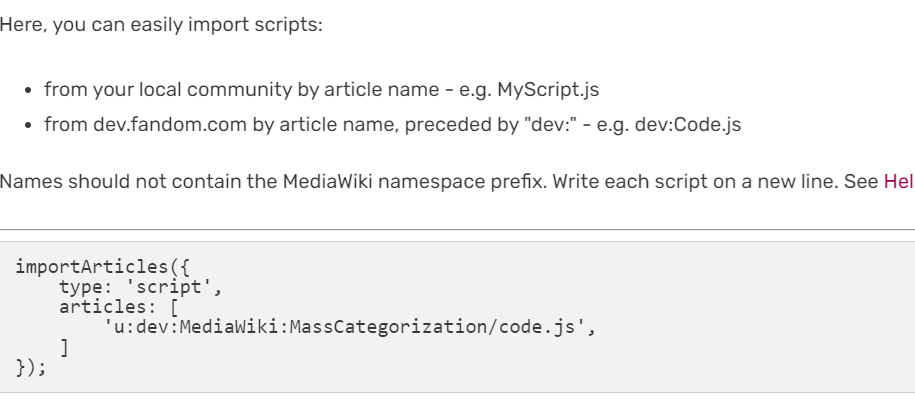

- That import method is for .js pages, like Common.js or global.js. ImportJS uses this syntax:
dev:MassCategorization/code.js - MassCategorization is for personal use. Not for sitewide installation. Put it in your personal js.
- -D 06:15, 1 June 2024 (UTC)
- That import method is for .js pages, like Common.js or global.js. ImportJS uses this syntax:
Mass Template-rization
First off, thanks for this wonderful tool.
Would it be difficult to adjust the tool to allow mass adding/removing simple templates like hatnotes? I've been using hatnote templates (that categorize) in place of manual category syntax, like {{stub}} and would like to be able to use the tool to add or remove them like categories. Crystalsun1 (talk) 06:00, 11 July 2024 (UTC)
- I believe MassEdit can already do that. -- Cube-shaped garbage can 06:29, 11 July 2024 (UTC)
- I'll have to try that out. Thank you! Crystalsun1 (talk) 09:54, 20 July 2024 (UTC)
"badtoken" error
I recently started using MassCategorization and had no trouble with it the first day. Now, whenever I try to recategorize any files I get an error message saying "Could not publish an edit to <file name>: badtoken" and no changes are made. I'm not doing anything different from before, so what gives? Bologhine (talk) 07:26, 7 August 2024 (UTC)
- Did you try logging out and back in? -- Cube-shaped garbage can 16:51, 7 August 2024 (UTC)
- Sorry for not replying earlier, I was away. It seems to be working again now. Bologhine (talk) 13:31, 28 August 2024 (UTC)
- I looked at this talk page because my co-admin was having this issue while I wasn't, and logging out and back in definitely fixed it. Thanks! • MJLogan95 | Message Wall • Contributions 16:38, 14 June 2025 (UTC)
What does it mean by lines?
I want to replace a category for many pages, but i can't figure out on how to do it. It says: "Put the name of each page you want to categorize on a separate line" but i don't really know what the "separate lines" means or how to add them, can someone explain it in a simple term? AwakenedKama (talk) 07:39, 26 August 2024 (UTC) (please sign your comments with ~~~~)
- It just means you need to add a newline between each page you want to categorize, which you can do by pressing Enter on your keyboard. DestroyerTau (τalk) 08:16, 26 August 2024 (UTC)
"ratelimited" error
I've noticed lately that a good chunk of my pages are not being categorized due to a "ratelimited" error. It is rather annoying to deal with this and I would like to know if there's anything I could do to prevent this from happening? AndromedaMapping1 (talk) 04:57, 12 April 2025 (UTC)
- This should be impossible with the default configuration, unless fandom changed the default edit ratelimits. Where are you using this, on what account? -D 15:34, 12 April 2025 (UTC)
- I'm using it on this wiki on this account. AndromedaMapping1 (talk) 16:04, 12 April 2025 (UTC)
- Okay. So this is embarrassing.
For youFor staff or mediawiki or whatever, looks like they lowered it from 40 edits per minute down to 20. And I'm guessing for bots they're still doubling the base rate, so bots can only do 40 edits per minute now. Though I haven't tested the bot limit, since I don't happen to have a bot account on hand to do it. Would you like to? for (let i = 0; i < 60; i++) { const date = new Date(); await new mw.Api().post({ action: 'edit', title: 'User:Dorumin/hello-rc', summary: '', text: `edit ${i} - at ${date.toISOString()}`, token: mw.user.tokens.values.csrfToken }); }
- I suppose I'll have to double the script's default delay from 2000 for regular users and 1000 for bots to 4000 for regular users and 2000 for bots. You can follow the docs on page to change it for yourself, something like
window.MassCategorization = { delay: 2000 };on your common.js page.Although I'm not sure how you're importing this script to begin with. It's not on a gadget, or your user js, or Common.js or ImportJS.Actually, I suppose it makes sense it's on global.js -D 16:45, 12 April 2025 (UTC)
- Okay. So this is embarrassing.
- I'm using it on this wiki on this account. AndromedaMapping1 (talk) 16:04, 12 April 2025 (UTC)
Categories With Spaces
As I've been using this I noticed something: a lot of people apparently add categories like [[Category: Page]] (I guess because many keyboards automatically add spaces, like phones when click a suggested word). The tool removes all [[Category:Page]] and leaves all [[Category: Page]]
Seems like perhaps a simple fix to make it include those as well since they still get treated as proper page categories. BlackDragon 15:09, 16 November 2025 (UTC)
- Fine. I guess categories can also have trailing whitespace on top of leading. It's just a regex match, it's not like it runs the actual wikitext parser to capture what would be the source of the category. -D 16:57, 16 November 2025 (UTC)
Suggestion: maybe add a scrollbar when an user presses + if possible please
As you've noticed from this screenshot, there seems to be a cap of how much category contents can be modified at once is 6. And you also are unable to check the list of the pages you wish to modify the categories on them.
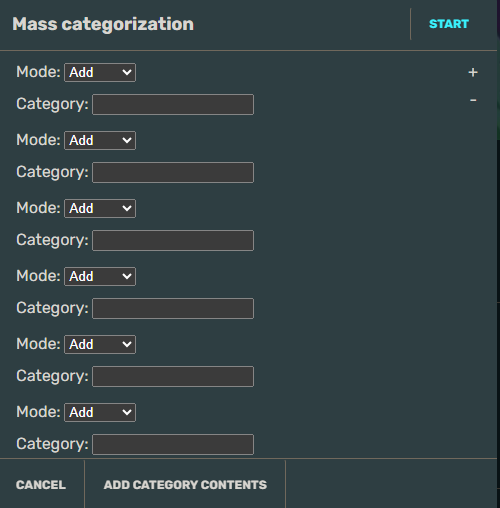
Even if you try to click on the "+" again after the 6th one, it won't work after you press "Start" because it requires the 7th field to filled in as well, which isn't accessible without the ability the scroll on the ui.
Yes, I've noticed there's a button that says "Add Category Contents" too to shorten the tool, but I'm not sure how it works. I've tried typing in the field for example "CatA, CatB" or "CatA,CatB", both do nothing. Which means it requires 1 whole field for 1 category modifier, which can be troublesome when you try to remove a huge list of categories from multiple articles at once.
So my suggestion is to either add a scrollbar on the right side there as well or fix the "Add Category Contents" at the bottom.
Thank you. *Rebecca* (🐇) 19:25, 21 May, 2026 (UTC) 19:25, 21 May 2026 (UTC)
- I'm seeing a scrollbar when I use the button to add more categories. Which browser and device are you on?
- The "add category contents" can add all pages from a particular category into the text box below. The text box represents the list of pages that the categories you specify will be added to or removed from.
- -- Cube-shaped garbage can 19:39, 21 May 2026 (UTC)
- Hello, I use Google Chrome and I'm using PC. I'm not sure if it's the cause. I can see the scrollbar on the list of the pages in the text box, but not the main ui itself.
- Also thank you a lot, that's a really helpful feature.
- *Rebecca* (🐇) 19:55, 21 May, 2026 (UTC) 19:55, 21 May 2026 (UTC)