This is the talk page for discussing improvements to the Fandom Developers Wiki page.
- Please sign and date your posts by typing four tildes (
~~~~). - Put new text under old text. Click here to start a new topic.
- If you're new to the wiki, please take a look at the talk page help.
- Be polite
- Assume good faith
- Be welcoming
Excuse Me
I am not a Wikia Developer. Would it be against the terms of use for me to add something to my wiki like this: Chatango? Magma-Man 16:27, May 12, 2011 (UTC)
- It's not against the ToU to change your code - that's what the code pages on your wiki are for. Feel free to take anything here and put it on your wiki. ~Monchoman45 (Talk | Contribs | Central) 19:41, May 5, 2011 (UTC)
Using extensions and skin on my own wiki
I have my own wiki set up. But it's quite limiting and I'm used to Wikia's skin and features so I would like to have those implemented in mine. I have found the repository but when I downloaded a specific release from the wikia/releases folder and install the wiki, it shows errors.
I don't need all extensions, mainly just the ones related to the format and editing of pages and the Oasis skin.
Kind regards, Nivaoo 10:37, February 12, 2012 (UTC)
Demo for a project on this wiki
Hi!
I just added a little project to this wiki and I have a problem introducing it. I've probably managed to describe the project well enough but I'd much rather show it instead. So I was wondering if I could have my own little JavaScript hook and my own little CSS hook on this wiki?
Something like:
$(function() {
    if ($('#infowidgets-demo')) {
        importScriptPage('InfoWidgets/demo.js', 'dev');
	$('head').append('<link>');
	$('head').children(':last').attr({ rel: 'stylesheet', type: 'text/css',
            href: '/wiki/InfoWidgets/demo.css'
        });
    }
});
Pecoes 14:11, February 19, 2012 (UTC)
- Hey Pecoes. I added it here. Let me know if you have any issues. Cheers, grunny:~$ 04:26, February 20, 2012 (UTC)
- Thank you Grunny! The JS import works perfectly, but the CSS import fails with the error "importStyleSheetPage is not defined".
- PS I forgot to add
.lengthto the elment check in my code proposal above, didn't I? :) -- Pecoes 04:57, February 20, 2012 (UTC)
- Oops, forgot the capitalisation was importStylesheetPage, should be working now. Cheers, grunny:~$ 05:21, February 20, 2012 (UTC)
- Perfect! Thank you! :) -- Pecoes 06:29, February 20, 2012 (UTC)
New protection level
Hey all. Per the concerns and ideas raised here, I've created a new user group called "codeeditor". Pages can now be protected so that they require you to have the codeeditor permission. The way I thought it could work is the most high use scripts such as AjaxRC and FastDelete could remain admin-protected so that it has a sort of "gated trunk" model. But if any users would like it so that only people who have been trusted with the codeeditor permission could edit the code of a moderately used tool, they can ask and I'll protect it in that way. This also doesn't prevent any users from contributing code as pages are unprotected by default. If you would like your code protected in this way, just leave me a message. If you want to be in the codeeditor group, leave me a message with a link to the code you maintain. Thoughts? Questions? :) grunny:~$ 17:43, February 24, 2012 (UTC)
- Do users in the "codeeditor" group get the power to protect or just edit pages at this new protection level? How do you know what code will get protected at this new level? Will there be a list or something? I've been putting what I learn about this new "codeeditor" group at Codeeditor. -- Fandyllic (talk · contr) 13 Mar 2012 4:03 PM Pacific
- Just edit. MediaWiki ties the right 'protect' to allow both to be able to modify all protection levels and edit any protected page, so it's not possible (without writing and extension) to give them the ability to protect at just this level. I was basically thinking that it would be on request of the authors. If a script seemed to be starting to be used by a number of users around wikia, I will leave the author a message about protecting it and giving them the right. We could probably list the pages protected with it to keep track. Thanks for documenting it, and please let me know if you think this could be improved. :) Cheers, grunny:~$ 14:15, March 14, 2012 (UTC)
favicon?
I was wondering if someone could make a favicon for dev.wikia.com ?
The current background image file:Wiki-background would make an excellent icon (if given a black background and made square, and cropped to the right size)
ForestMonthZero 05:03, March 9, 2012 (UTC)
- There you go. File:Fav.png --Noemon *talk* 19:07, March 10, 2012 (UTC)
- Can an admin update File:Favicon.ico to this image? ForestMonthZero 07:47, March 11, 2012 (UTC)
- Uploaded it. Marc-Philipp (Talk) 13:04, March 14, 2012 (UTC)
- Can an admin update File:Favicon.ico to this image? ForestMonthZero 07:47, March 11, 2012 (UTC)
Wikia support database? I mean I can create my own table.
Qi 6930 (talk) 16:28, December 6, 2012 (UTC)
- Only the server side code can create tables. If you want a table of your own, you'd have to write your own MediaWiki extension in PHP to create that table. Then you would have to ask Wikia Staff to review and maybe even install that extension for a certain wiki. -- pecoes 16:49, December 06, 2012 (UTC)
Code Review section
With Wikia's final and complete conversion to Git, shouldn't this section be removed or adjusted accordingly?TK-999 (talk) 21:21, January 4, 2013 (UTC)
- Updated links for GitHub. Cheers, grunny:~$ 02:32, January 5, 2013 (UTC)
Random?
I'm trying to implement a random test on my wiki. There are 35 sections, each with 11-13 possible questions, and one question should be chosen from each section. I took http://en.wikipedia.org/wiki/Template:Random and put it on my wiki. The problem is that the whole page loads at once, so basically the same number is chosen for each section. Take a look: http://radio.wikia.com/wiki/Random_Technician Any ideas, any suggestions, can you implement anything to let me do this (I don't think it's currently possible)? Banaticus (talk) 06:27, April 29, 2013 (UTC)
Importing Wikipedia Article
Would really love to import a Wikipedia to have something to start on my Wiki.
However, even after trying through the different options in the Wikipedia Export page, as well as messing around with the XML of the file in question, it will successfully import, but display nothing (even when creating the templates in question, unlike in Wikipedia they show only 'initiage message' text without actually displaying it.
Is there a workaround that could be worked on? I know Wikipedia is updating its own code, but how to keep track? This would spark a new time of interwiki compatibility, which can not be understated in its importance.
<@]-|-+- SF -+-|-{@> (talk) 20:35, November 5, 2013 (UTC)
- I believe it's possible to import articles from Wikipedia, but in practice I on't know where it's been tried. I'd suspect there might be issues with the user databases not being the same. I'd suggest copy pasting the page over in it's entirety and doing one of two things:
- Add a notice at the bottom of the page linking back to the wikipedia article with a disclaimer saying where the article came from and possibly some legal copyright stuff.
- Do the same as the notice, but do so in the edit summary of when you first copied the page over. This can only be done on the edit you copied the page, it can't be done after as the copyright license doesn't work that way. If this option is unavailable, you'll have to do the first option.
- Hope this helps, cqm 00:22, 6 Nov 2013 (UTC)
Question of do-s and don't-s
Are CSS/very very light JS modification/addition projects allowed here? Just for a hypothetical example, if I had a little project on my test wiki/writing wiki designed to optimize the editor for writing by adding-oh-I dunno. More buttons, or changing the default editing font, etc. , would this project be allowed here?
Generally speaking-if I have something that isn't, well, JS core, but rather CSS/light JS core, is it allowed? ~ MasterCeadeus 06:45, December 9, 2013 (UTC)
- If you think it can be used on number of other wikis, then sure.~UltimateSupreme 10:24, December 9, 2013 (UTC)
Java project for creating templated pages from spreadsheets
Last summer I wanted to create several pages with infoboxes into one wiki and created a little Java application to help me with it. I've got it at GitHub as mediawiki-spreadsheet-templator. The idea is that you can create a spreadsheet where each row then gets converted into a new wiki page with an infobox. There's an image on the page I linked that will hopefully explain it. Basically the app converts a spreadsheet into an XML file that can then be imported into a MediaWiki instance. Someone from the Wikia IRC channel suggested that I mention it here, in case anyone else was interested. It's very bare bones currently, but suffices for my needs. Forks and pull requests would obviously be much appreciated. :) Cheers, —ZeroOne (talk) 17:14, January 10, 2015 (UTC
- You should make a page for it and explain what it does and how to get/use it. That way anybody that wants to use or help with it knows where to start. — Foodbandlt (talk) 17:36, January 10, 2015 (UTC)
- Alright, here you go: MediaWiki Spreadsheet Templator. What do you think? —ZeroOne (talk) 01:21, January 11, 2015 (UTC)
- Looks good! — Foodbandlt (talk) 01:25, January 11, 2015 (UTC)
Wikia repository
I am curious how the wikia staff expects anybody to help them clean up their code, and help develop the wikia codebase, when important files that are needed to set up a successful install of a local wikia page are missing from the repository. I have spent the last 5 hours trying to hack my way through getting the wikia code from the repository running locally, and it's one problem after another. For one, you are missing the most important connection to the whole system, the 'LocalSettings.php', which I understand is because passwords are in that file, but it's not difficult, nor does it take much time to search through the file and remove these. Seeing as this file is the basis for loading all extensions, the skins, and everything else, I would think that this file would be included for developers to work. I mean after all, any good developer still has to be able to functionally test what they are developing, and without being able to setup an environment to allow them to do that, how is anybody supposed to contribute?
I've been doing web development for close to 15 years, and this shouldn't be a difficult task to accomplish yet it is merely because the code is in such disarray, and unable to be cleaned up by anybody outside of wikia.
Is there something you can do to fix this? —Preceding unsigned comment added by Masteryoer (talk • contribs) 17:30, 8 April 2016 (UTC). Please sign your posts with ~~~~!
Mobile Main Page Improvements
In the mobile main page, can we add optional categories, such as CSS, JS and Lua? ~Signed JustLeafy ( ͡| ͜' ͡| ) 03:53, November 15, 2017 (UTC)
Issue with the right column
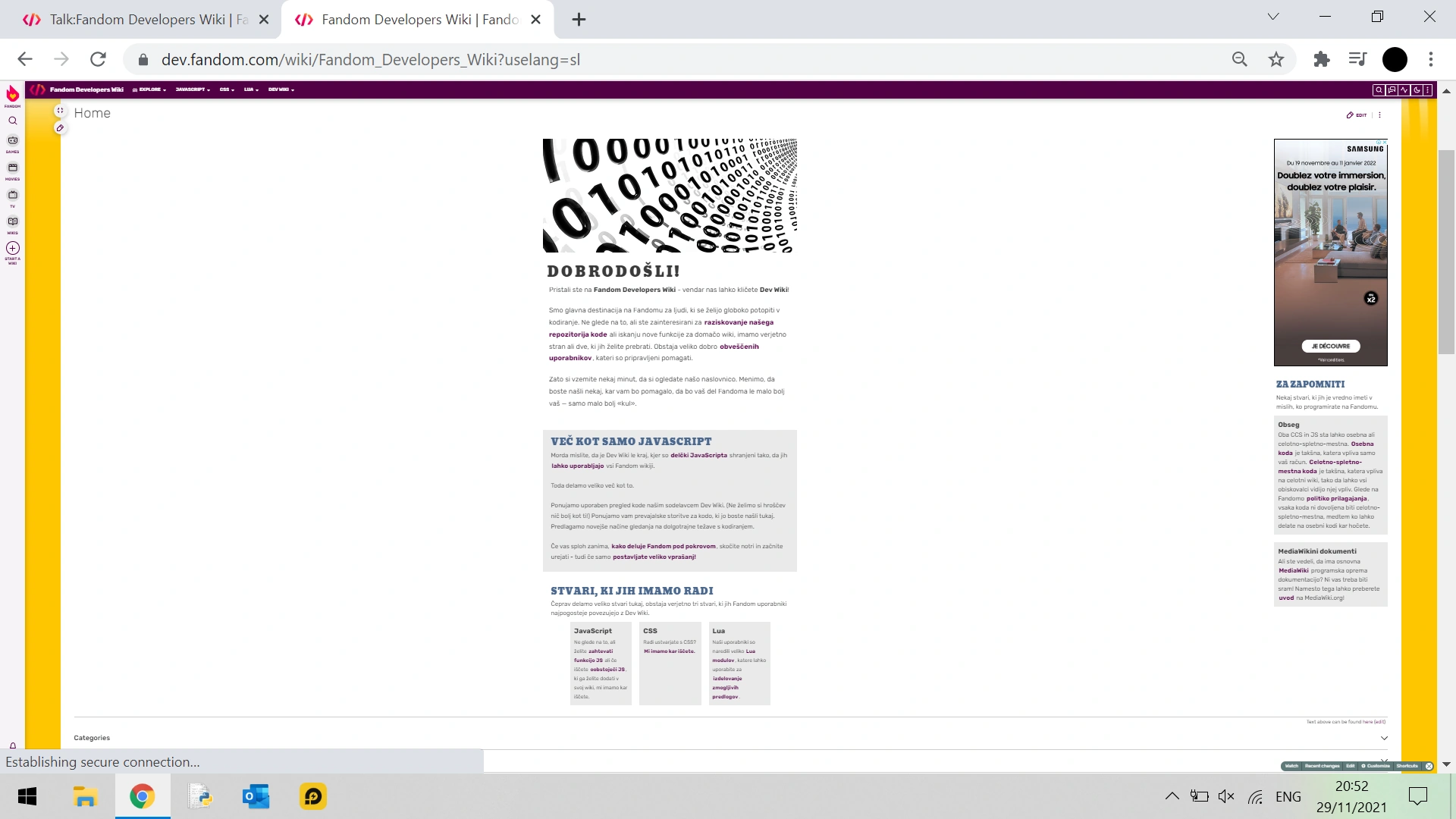
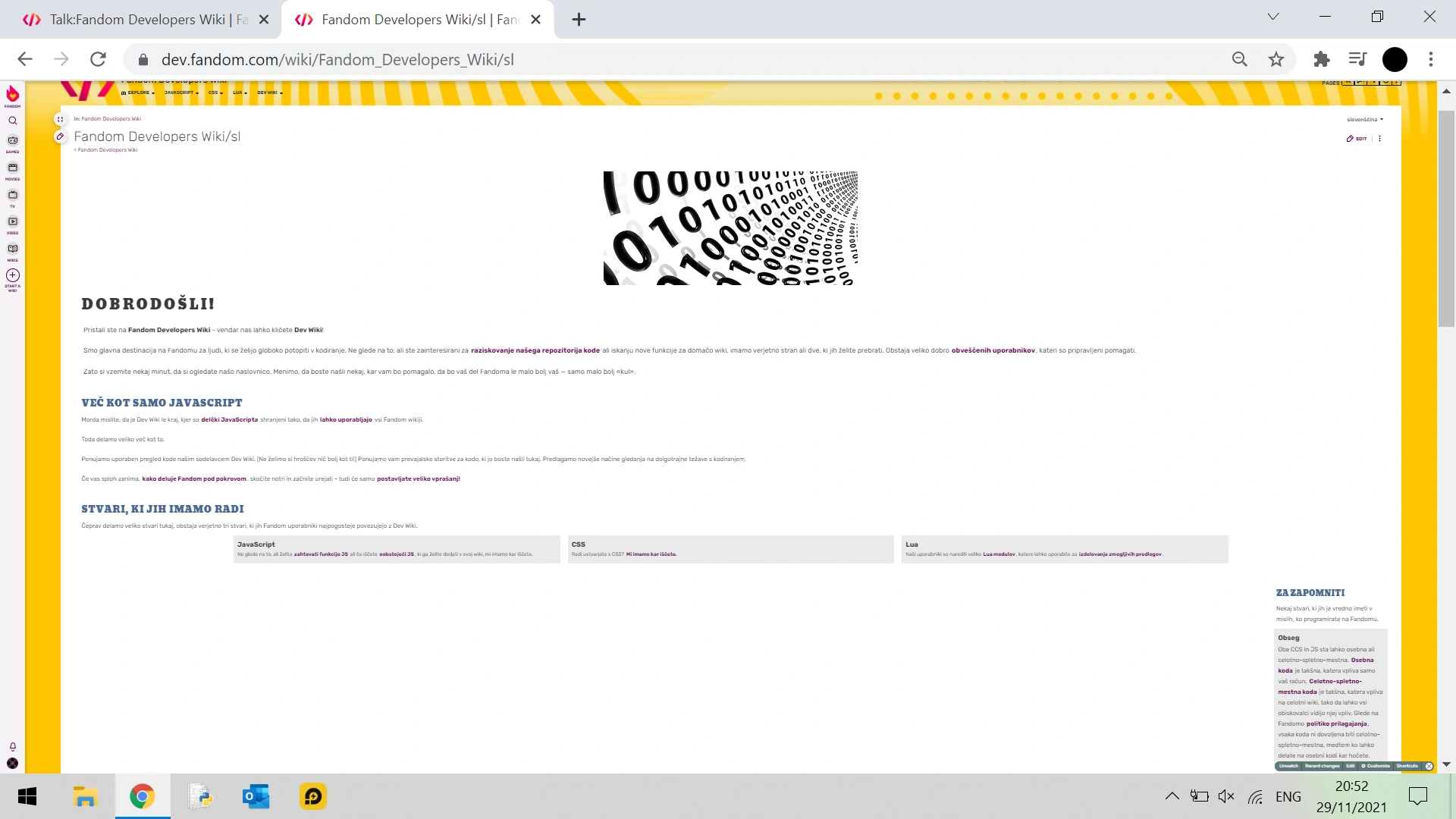
The right column does not work properly in different URLs. When a language is selected in the language link section (top right) you are taken to the translated version of the home page with the URL ending in something like "Fandom_Developers_Wiki?uselang=sl". On these URLs the right column functions correctly. But if you access the same home page with a language link that has an ending something like "Fandom_Developers_Wiki/sl" (which you could access, if you go to "Recent changes" and clicked the page with such URL), the right column is pushed to the bottom of the page (see screenshots).
.png)
URL ending: "Fandom_Developers_Wiki?uselang=sl" - Slovenian home page.
Zoom: 33%.
.png)
URL ending: "Fandom_Developers_Wiki/sl" - Slovenian home page.
Zoom: 33%.

.png)
URL ending: "Fandom_Developers_Wiki?uselang=de" - German home page.
Zoom: 0%.

.png)
URL ending: "Fandom_Developers_Wiki/de" - German home page.
Zoom: 0%.
The right column is pushed down to the end. I think this might be a problem with the template or URLs. I have checked and this bug also appears on different language links with a similar URL ending.
The Crossblade (talk) 20:20, 29 November 2021 (UTC)
- The language subpages don't have the rail positioned the same way because they are not the main page, so the column tag styles are not loading. The main page column tags not displaying properly on different widths should be a bug you can report to Fandom. -- Cube-shaped garbage can 20:28, 29 November 2021 (UTC)
Image


The image displayed at the top of the main page (File:MainHeader.png) is too large on iPad screens and spills over into the right column. I've included a screenshot to illustrate this. I can only think of two easy ways to remedy this:

- Scale down the image to a size that fits better
- Remove the image.
I would lean toward the latter, as I've never liked the image much, but the first options works just as well. Thoughts, anyone? Mr. Starfleet Command (talk • contribs) 19:52, 22 August 2024 (UTC)
- This should be fixed in CSS now. -- Cube-shaped garbage can 23:02, 22 August 2024 (UTC)
- Now the right rail doesn't display at all – I assume that's part of the solution?
- Also, there's an excess amount of white space between the "Things We Like" section and the "Text above can be found here" snippit. I'm not sure if that was an issue before, though.
- Regardless, this is definitely better than it was before, so thanks :) Mr. Starfleet Command (talk • contribs) 01:32, 23 August 2024 (UTC)
- The right rail is below other contents on narrower screens. Always has been, I just changed how narrow the screen has to be. -- Cube-shaped garbage can 01:35, 23 August 2024 (UTC)
- Well, for me, the right rail disappears on narrower screens. I've checked the page source and the rail is still there, but for some reason it doesn't display. I've tried to identify which bit of CSS is causing the problem or which bit could be used to fix it, but I haven't figured it out yet. Mr. Starfleet Command (talk • contribs) 01:46, 24 August 2024 (UTC)
- Look at the bottom of the main page. Do you see a "Things to remember" section? -- Cube-shaped garbage can 01:55, 24 August 2024 (UTC)
- No. Mr. Starfleet Command (talk • contribs) 02:16, 24 August 2024 (UTC)
- Can you show how does the bottom of the page, the part above the categories, look like for you? -- Cube-shaped garbage can 17:01, 24 August 2024 (UTC)
- I see. I applied this change and it seems to work now, at least on my iPad. -- Cube-shaped garbage can 17:15, 24 August 2024 (UTC)
- It's better now, but it still doesn't work quite right on my iPad: the rail displays, but it's not centered on the page like the stuff above it, and it's still 300px wide. This time, I've figured out how to fix the issue:
- At line 847, change
paddingto0 - Add
width: auto;right below that, still in the.main-page-tag-rcsblock. - Add
    .main-page-tag-rcs .rcs-container {
        width: auto;
    }
    .things-to-remember {
        width: 670px;
        margin: 20px auto;
    }
- At line 847, change
- That otta' do it. Mr. Starfleet Command (talk • contribs) 17:43, 24 August 2024 (UTC)
- It's better now, but it still doesn't work quite right on my iPad: the rail displays, but it's not centered on the page like the stuff above it, and it's still 300px wide. This time, I've figured out how to fix the issue:
- I see. I applied this change and it seems to work now, at least on my iPad. -- Cube-shaped garbage can 17:15, 24 August 2024 (UTC)
- Found the issue: Add this to common.css and it should work correctly :] DestroyerTau (τalk) 04:45, 24 August 2024 (UTC)
@media only screen and (max-width: 1200px) {
	.main-page-tag-rcs {
		clear:both;
		column-count: 2;
		float: none;
		padding: 13px 10px 0;
		width: auto
	}

	.main-page-tag-rcs .module {
		box-sizing: border-box;
		display: inline-block;
		margin: 12px 8px;
		position: static;
		vertical-align: top;
		width: 330px
	}

	.main-page-tag-rcs .module .carousel-container {
		left: 0;
		margin: auto;
		width: 265px
	}

	.main-page-tag-rcs .rail-module {
		display: inline-block;
		width: 330px
	}
}
- Can you show how does the bottom of the page, the part above the categories, look like for you? -- Cube-shaped garbage can 17:01, 24 August 2024 (UTC)
- No. Mr. Starfleet Command (talk • contribs) 02:16, 24 August 2024 (UTC)
- Look at the bottom of the main page. Do you see a "Things to remember" section? -- Cube-shaped garbage can 01:55, 24 August 2024 (UTC)
- Well, for me, the right rail disappears on narrower screens. I've checked the page source and the rail is still there, but for some reason it doesn't display. I've tried to identify which bit of CSS is causing the problem or which bit could be used to fix it, but I haven't figured it out yet. Mr. Starfleet Command (talk • contribs) 01:46, 24 August 2024 (UTC)
- The right rail is below other contents on narrower screens. Always has been, I just changed how narrow the screen has to be. -- Cube-shaped garbage can 01:35, 23 August 2024 (UTC)
Full Protection Request
VITTAPUFF2022 (talk) 14:12, 30 April 2025 (UTC) On most wikis, the main page is fully protected. Why not this one?VITTAPUFF2022 (talk) 14:12, 30 April 2025 (UTC)