MastodonEmbed allows embedding Mastodon posts on wiki pages.
Mastodon is an open source decentralized social media platform offering microblogging features similar to Twitter. This script allows embedding posts from any instance of Mastodon.
Please see #Limitations to learn more on what this script can't do and #Configuration to configure instance whitelisting on your wiki.
Consider reading a blog post about integrating wikis with Mastodon to learn more about possible usage of this script and other aspects of using Mastodon for wikis.
Limitations
- Due to a missing feature in Mastodon's OEmbed implementation, only posts can be embedded from instances. That means timelines cannot be embedded. Please use alternative solutions such as RSS feeds on wiki pages, RSS guide for Mastodon can be found here. Please see #Timeline embed workaround for using RSS feed together with this script for more interactive experience.
- Due to security concerns, embeds can be used only with instances that respond to
/api/v2/instanceHTTP requests, confirming they are running Mastodon. This means certain instances with specific CORS settings may not work. - Due to security concerns, embeds generated by MastodonEmbed do not support external JavaScript, meaning that images and other media inside embedded posts will not be loaded.
- Please note that due to the decentralized nature of the Fediverse, different Mastodon servers are located in different geographical locations, meaning that embeds from certain instances might be slow to load for some users.
Installation
Usage
In order to add an embed, you must add an HTML element matching the required selector class, by default it has to be a <div> element with mastodon-embed class.
Posts to embed are added inside data-url attribute, additional parameters controlling embed's width and height are added by data-width and data-height attributes respectively.
For example the following code will result in an embed of the introduction post made by official Wikipedia's account on the Fediverse:
<div class='mastodon-embed' data-url='https://wikis.world/@wikipedia/110189029188205820' data-width='500' data-height='460'></div>
It is recommended to use a template when creating embeds for better maintainability.
Timeline embed workaround
Despite Mastodon not supporting embeds of user timelines, this issue can be worked around by utilizing RSS extension on wiki in combination with this script. That way you can pull the X amount of latest posts from a specified user and display them using embeds generated by MastodonEmbed.
In order to do that, create a template called "MastodonRssEmbed" with the following content:
<includeonly><div class='mastodon-embed' data-url='{{{link}}}'>[{{{link}}} Open post on Mastodon]</div></includeonly>
Then on the page you want to embed timeline on, add the following code. This example will generate the latest post from @wikimediafoundation@wikimedia.social:
<rss itemTemplate='MastodonRssEmbed' max='1'>https://wikimedia.social/@wikimediafoundation.rss</rss>
RSS extension is going to extract the latest toot from specified user and MastodonEmbed will render it in a more readable and interactive form. Users on mobile devices will be given a direct link to the post as a fallback.
Any amount of latest posts can be rendered as embeds that way by forming a chain of embeds:
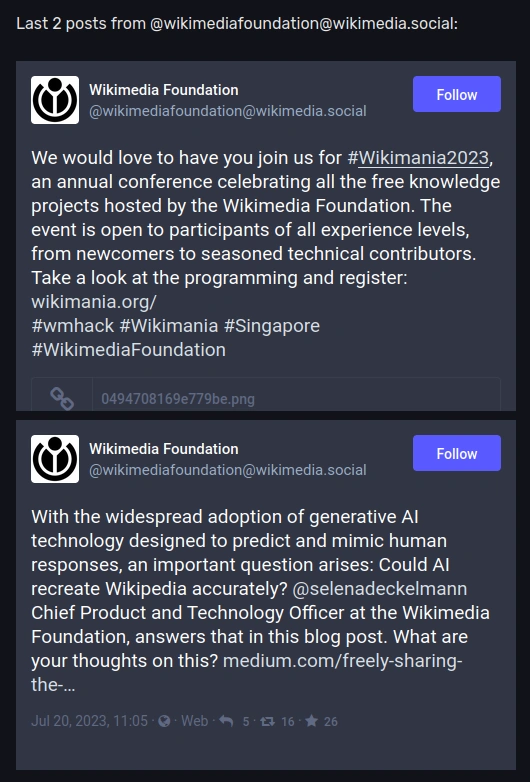

Embeds of 2 latest toots from @wikimediafoundation@wikimedia.social generated by combining RSS feed together with MastodonEmbed
More information about this workaround can be found in a blog post.
Configuration
MastodonEmbed script stores configuration inside window.mastodonEmbed object and supports the following options:
| Key | Description | Type | Default |
|---|---|---|---|
domainWhitelist
|
When not empty, only posts in domains or users specified in this key will be allowed on the wiki. By default, this list is empty, meaning all instances are allowed. | Array | []
|
embedSelector
|
DOM selector used to find HTML elements that are meant to be embeds. | String | .mastodon-embed
|
Example configuration
Using example configuration below, only posts coming from mastodon.social and wikis.world Mastodon servers as well as @wikimediafoundation@wikimedia.social user will be allowed on wiki:
window.mastodonEmbed = {
    domainWhitelist: [
        'mastodon.social',
        'wikis.world',
        '@wikimediafoundation@wikimedia.social'
    ],
    embedSelector: '.mastodon-embed'
};
Planned features and feedback
This script is currently in beta and doesn't have all features that I have planned for it. The following things might be added at a later date:
- Ability to embed timelines using a 3rd party embedding proxy.
- Rewriting script to generate entirely custom embeds omitting Mastodon's OEmbed implementation, which would bypass certain limitations of the current solution.
If you have any feedback or encountered issues, please add a note on the talk page.