BandcampPlayer lets you add the Bandcamp music player, where you can find most video game soundtracks, official or fan made.
Installation
Usage
Create a Music template page with this content:
<div id="bandcamp" class="bandcamp" data-src="{{{link|}}}" data-width="{{{width|100%}}}" data-height="{{{height|}}}"></div>
Add the player on a page:
{{Music
|link = https://bandcamp.com/EmbeddedPlayer/album=763852834/size=large/bgcol=ffffff/linkcol=ffffff/artwork=small/transparent=true
|width = 600px
|height = 600px
}}
link- It can be taken from Bandcamp's share button.
width- The player width.
height- The player height.
Getting link parameter
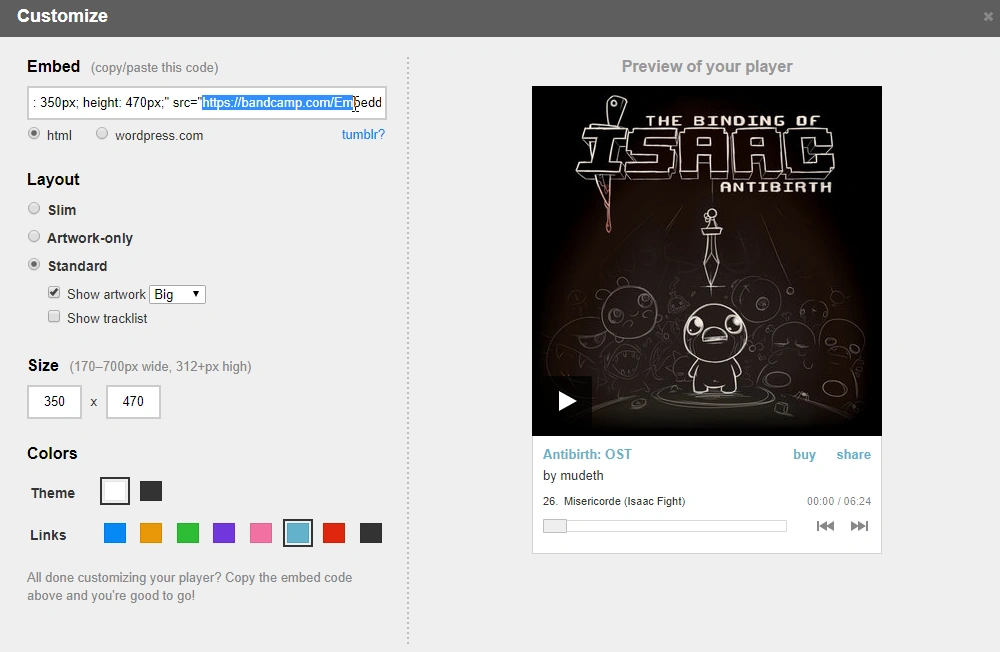

You can find the embed URL by pressing the Share button for the selected playlist/soundtrack. After customizing the player to your liking, select the content in the src attribute: src=" content to copy " and add it in the link template parameter.
Demo
Text above can be found here (edit)